
What You'll Learn in This Guide
Quick Answer
You can start a faceless YouTube channel with AI for free — ChatGPT for scripts, ElevenLabs for voiceover, CapCut for editing. But since January 2026, YouTube has suspended thousands of channels that skipped its AI disclosure rules. This guide covers the real setup steps and how to stay compliant while you build.
Most faceless YouTube guides skip one thing: YouTube suspended over 18,000 AI-generated channels in January 2026 for failing its disclosure and inauthentic-content rules. If you're starting a faceless YouTube channel with AI in 2026, that enforcement wave is now part of the job — not an edge case.
The good news is that it's a short list of rules, and most faceless content never triggers them. You don't need a camera, a microphone, or your face on screen. You do need to know exactly where the line is before you upload.
This guide walks through the actual channel setup (not just branding tips), a free-first AI toolstack, and the disclosure rules that the January enforcement wave was built around — so you can build something that lasts.
Is It Still Safe to Start a Faceless YouTube Channel with AI in 2026?
Yes — as long as you disclose the right things. YouTube's January 2026 enforcement wave targeted two specific problems: creators who didn't disclose realistic AI content, and channels mass-producing near-identical videos with no real editorial decisions behind them.
A typical faceless channel — AI voiceover over stock footage or AI-generated images, a script you've actually edited, original video ideas — doesn't fall into either category. The channels that got suspended were the ones treating AI as a full replacement for judgment, not the ones using it as a production tool.
What Do You Actually Need to Get Started? (Niche, Budget, Time)
You need three things: a niche, a few hours a week, and $0. That last part surprises people — every core tool in this guide has a free tier that's enough to publish real videos.
Your niche decides almost everything else — how fast you can grow, and how much each view is worth. Finance and technology channels tend to pay more per thousand views than entertainment or storytelling, but they're also more competitive. For the full breakdown of 2026's highest-paying niches and how to pick between them, see the highest-RPM niches for 2026.
Realistic time commitment: plan on 3-5 hours per video when you're new to the workflow, even with AI doing the heavy lifting — scripting, generating, reviewing, and editing all still take real time. That drops significantly once you've built a repeatable process.
Step 1 — Create Your YouTube Channel (The Actual Setup)
This is the part most guides skip. Before you touch a single AI tool, here's exactly how to set up the channel itself.
Create your Google account and channel
Use a dedicated Google account for your channel rather than your personal one — it keeps things separate if you ever add a team member or sell the channel later. Go to youtube.com, sign in, click your profile icon, and select "Create a channel."
Verify your phone number
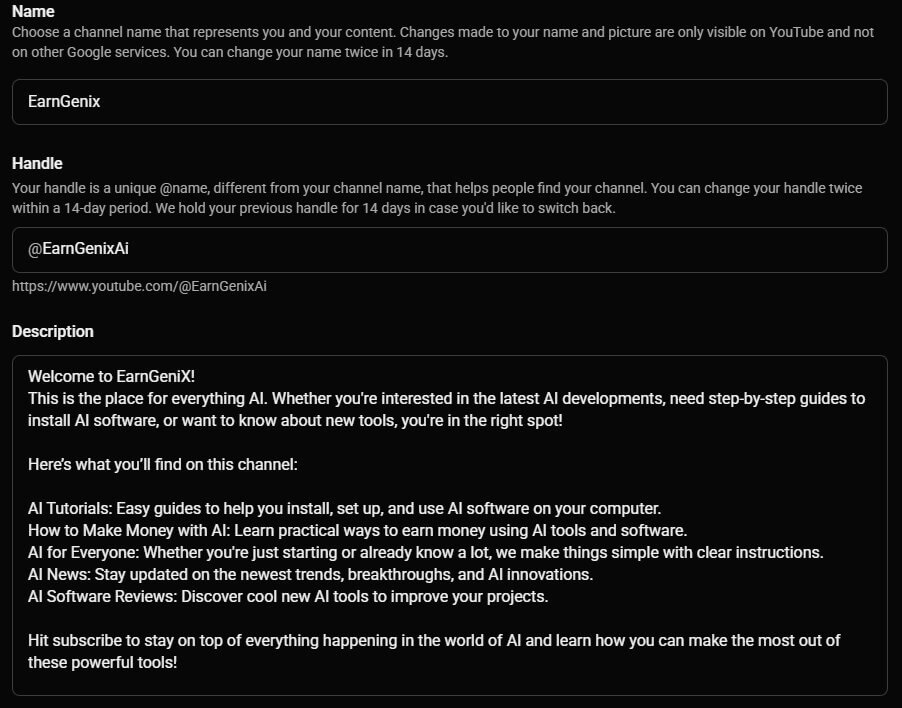
Set your channel name and custom handle
Use ChatGPT or Claude to generate 15-20 name options, then pick something brand-first rather than personality-first — "Wealth Simplified" scales and sells better than "Marcus Talks Money." Your handle (the @name) should be short, easy to type, and close to your channel name.
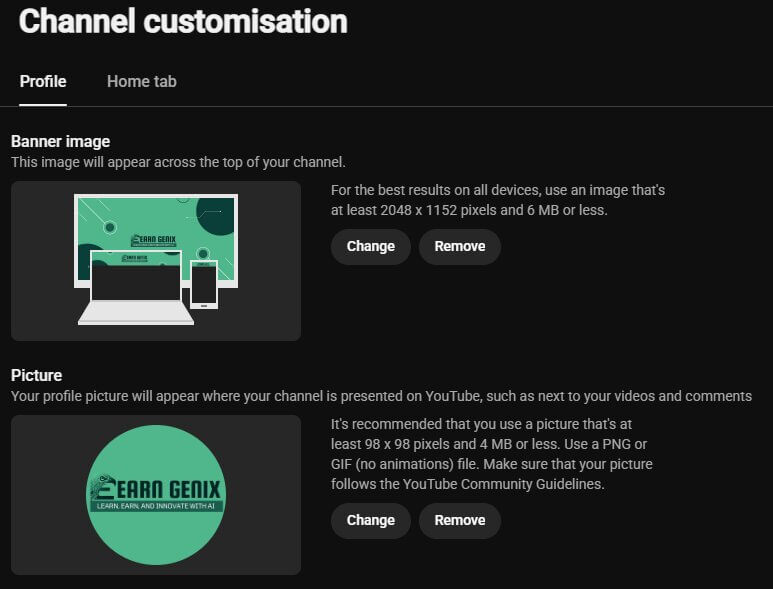
Upload your banner and profile picture
Exact dimensions matter here — get them wrong and YouTube crops your text or logo unpredictably on different devices.
- Banner: 2560×1440px, with your logo/text kept inside the 1546×423px "safe area" so it isn't cropped on TV or mobile
- Profile picture: 800×800px minimum, square — this is what shows next to your videos in search and suggestions
Write your channel description and About section
Put your main keyword in the first two lines — that's what shows before "read more." Be specific about what you cover and who it's for; vague descriptions get skipped by both viewers and YouTube's own recommendation system.
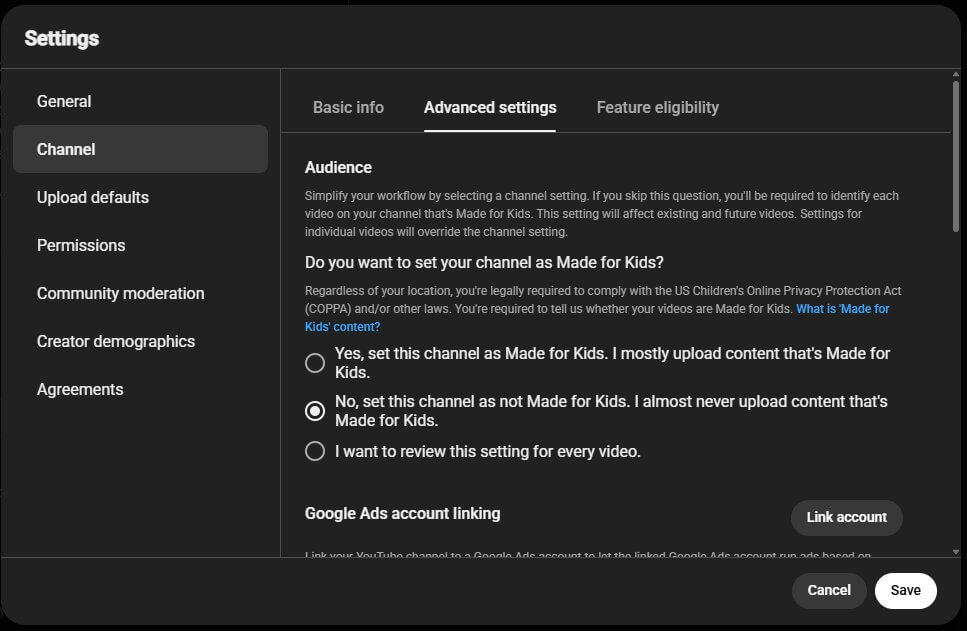
Set your "Made for Kids" status correctly
This is a legal requirement under COPPA, not an optional setting, and it's easy to get wrong by accident. Setting a channel as "Made for Kids" when it isn't turns off comments, personalized ads, and several monetization features across every video. Most faceless finance, tech, and storytelling channels should mark themselves as not made for kids — but check per-video during upload too, since the setting can be overridden at the video level.
Add channel keywords in advanced settings
In YouTube Studio under Settings → Channel → Basic info, add 5-10 keywords describing your niche. This helps YouTube understand your channel's context beyond individual video tags.
Step 2 — Build Your AI Toolstack (Free vs. Paid)
You can produce your first 5-10 videos on free tiers alone. Here's exactly what each part of the workflow costs, free option first every time.
Scripting
Voiceover
Visuals
Music
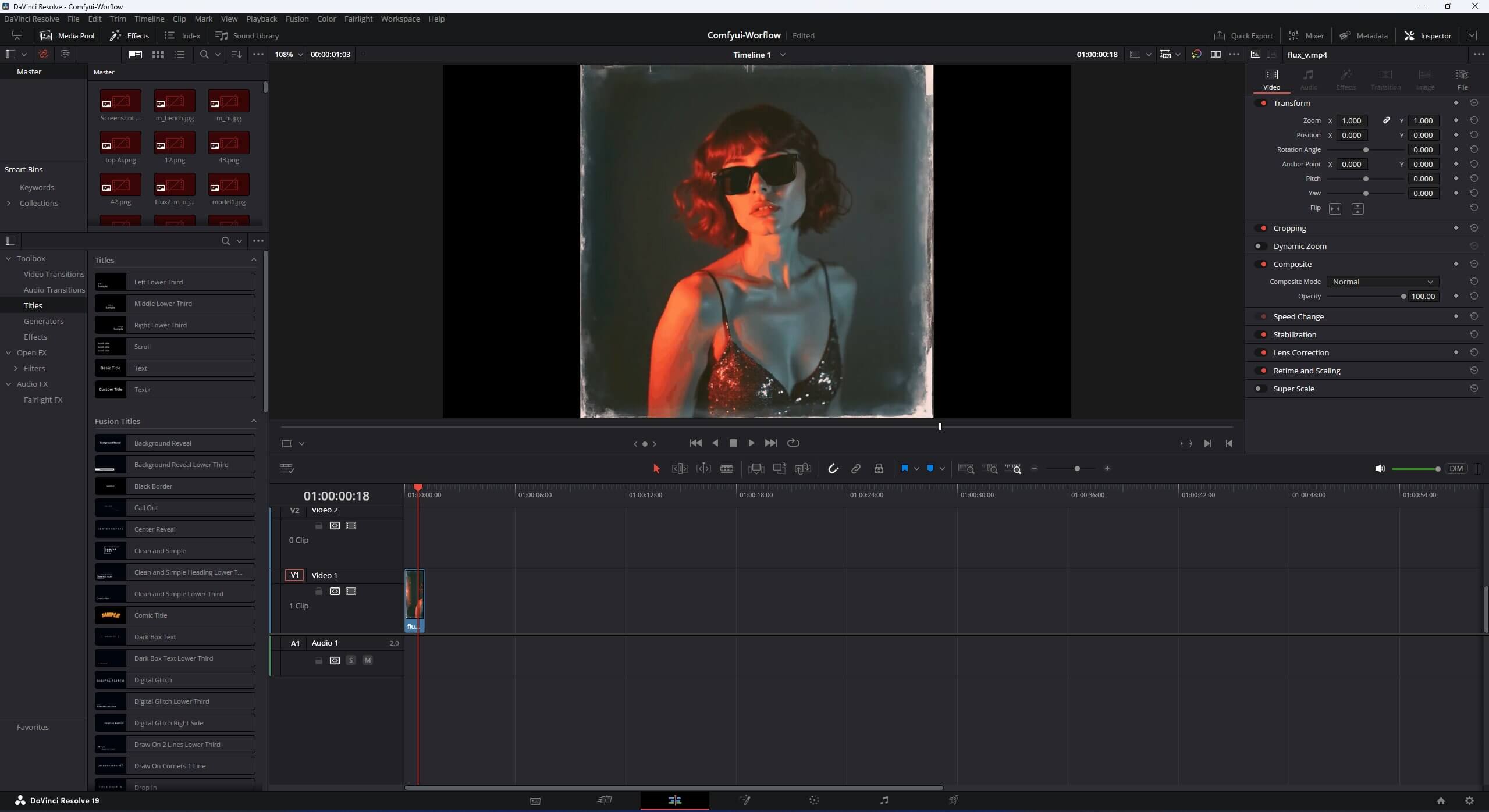
Editing
Step 3 — Write a Script That Doesn't Sound Like AI Wrote It
AI writes the first draft. You edit it. Skipping the edit is the single most common reason faceless videos feel flat — the words are right, but nothing about them sounds like a person.
A strong script prompt includes:
- Your target audience and tone — conversational, educational, dramatic
- The hook type and target video length
- A clear structure: hook → intro → main points → call to action
- Specific retention tactics you want built in
For writing help specifically tuned to YouTube scripts, see writing scripts with ChatGPT.
Step 4 — Generate Voiceover and Visuals
Match your voice to your niche — calm and slow for meditation or sleep content, energetic for motivation, clear and neutral for education. Most AI voice tools let you preview several options before committing.
For visuals, pick one path and stay consistent rather than mixing all three:
- Stock footage + text overlay — fastest, good enough for most niches, ideal for your first few videos
- AI-generated images — best for a distinct visual identity in storytelling or documentary content
- Screen recording — simple and effective for tech and AI-tool tutorial channels
Step 5 — Do You Need to Disclose AI Use? (YouTube's 2026 Rules Explained)
Read this before you publish your first video, not after. YouTube's "Altered or Synthetic Content" policy is what the January 2026 enforcement wave — over 18,000 channels suspended — was built around, and it directly affects faceless AI channels.
What actually requires disclosure
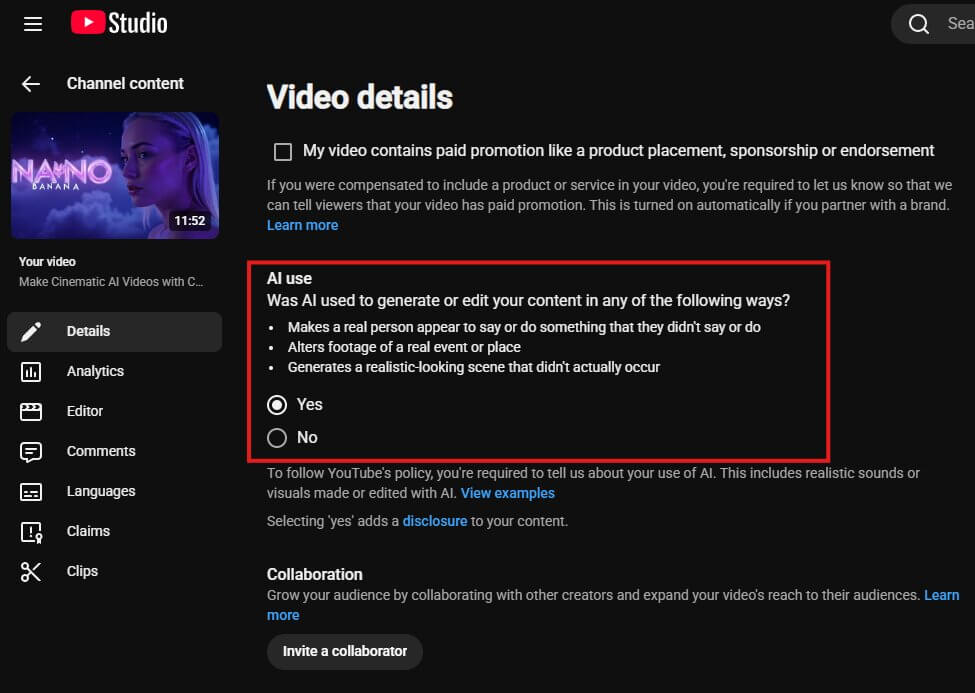
You need to toggle "Altered or synthetic content" in YouTube Studio when your video:
- Makes a real, identifiable person appear to say or do something they didn't
- Alters real footage of an actual event or place — making a real building appear to catch fire, for example
- Generates a realistic-looking scene depicting something that didn't actually happen
What does NOT require disclosure
Most faceless AI content falls here, according to YouTube's official disclosure policy:
- AI voiceover layered over stock footage or AI-generated visuals
- AI-generated images, animation, or stylized visuals that aren't trying to look like real footage
- Using AI for scripts, outlines, thumbnails, or titles — this counts as "production assistance," which is explicitly exempt
- Obviously unrealistic content, even if AI-made — animated explainers, motion graphics, illustrated stories
How to disclose it (takes under a minute)
- During upload, go to the "Details" step in YouTube Studio
- Scroll to "Altered or synthetic content" and select Yes if it applies
- YouTube adds a label to your video description automatically — this does not reduce your reach or reduce monetization eligibility on its own
Why the January 2026 wave happened
The channels that lost monetization or got suspended weren't punished for using AI — they were punished for two specific patterns: consistently not disclosing realistic content, and mass-producing near-identical, low-effort videos with no real editorial decisions behind them (the "inauthentic content" policy, separate from disclosure).
Step 6 — Upload and Optimize for Search
Every upload field is a search opportunity. Don't leave any of them half-filled.
- Title: main keyword included naturally, under 60 characters, benefit-led
- Description: 150-300 words, most important keywords in the first two lines (shown before "read more")
- Tags: mix broad and specific — "faceless youtube channel", "how to start a faceless youtube channel with ai"
- Chapters: add them for anything over 5 minutes — they improve navigation and can appear in Google search results
- End screen: always link a related video or a subscribe prompt
How to Actually Grow Once You're Publishing
AI makes production easy. Growth is still hard, and it's still mostly about consistency and honest self-review — not a trick.
- Post 3-5 videos a week. One or two a month never builds algorithmic momentum, no matter how good they are.
- Study your analytics after 20-30 videos — patterns only become visible at that volume. Double down on what's actually working.
- Fix your hooks first if retention is weak. The first 30 seconds decide most of what happens next.
- Study the top videos in your niche and fill the gaps they missed, rather than copying their format outright.
How Much Can You Realistically Make? (Month 1, Month 3, Month 6)
Most beginners make $0-$100 in month one. That's normal for a content channel — you're not YPP-eligible yet, and audience-building takes time regardless of how good your AI tools are.
Creators who keep posting consistently for 90 days typically reach $100-$800/month once they're monetized and posting 3-5 videos a week. That range depends heavily on niche — finance and tech pay more per thousand views than general entertainment.
Beyond ad revenue, affiliate links, sponsorships, and digital products can extend your ceiling well past that — but each of those requires an established, trusting audience first. None of them replace the first 90 days of consistent, honest effort. For the fuller breakdown of what a beginner can realistically expect in the first month specifically, see what beginners realistically earn in their first month.
How to Monetize Beyond Ad Revenue
Ad revenue through the YouTube Partner Program is the obvious path, but it's far from the only one — and not always the fastest.
YouTube Partner Program (Ad Revenue)
Standard eligibility: 1,000 subscribers and 4,000 watch hours in 12 months (or 10M Shorts views in 90 days). An expanded program also exists at 500 subscribers with 3,000 watch hours or 3M Shorts views, unlocking earlier access to some features — see the official eligibility page for current thresholds.
Affiliate Marketing
No YPP approval needed — you can earn from your first video. AI and tech-focused channels can promote software tools with strong commission rates.
Sponsorships
Brands reach out earlier than most people expect — even 5,000-10,000 subscribers in a focused niche can attract real sponsorship interest.
Digital Products
Prompt packs, workflow templates, or planners — build once, sell repeatedly to the audience your channel builds. Requires trust built over several months first.
Common Mistakes That Kill Faceless Channels Early
Posting across multiple unrelated niches
Pick one. YouTube's algorithm rewards focused channels — spreading across topics confuses both the algorithm and your audience.
Uploading raw AI output without editing
Unedited AI scripts sound robotic and unedited voiceovers sound flat. Treat AI output as your first draft, not your final product.
Never checking the disclosure rules
Most faceless content doesn't need the disclosure toggle — but the channels that got suspended in January 2026 usually didn't even know the rule existed.
Quitting before 30-50 videos
Most channels that eventually succeed looked like failures at video 20. You need that much data before you can make good decisions about what's working.
Ignoring analytics
Click-through rate, retention, and watch time tell you what to do next. Check them weekly instead of guessing.
What to Do Right Now
Open YouTube Studio, verify your phone number, and write your channel name and description. That's the real first step, and it takes about ten minutes — everything else in this guide builds on having that in place.
Frequently Asked Questions
Join the discussion
Sign in to leave a comment or reply
No comments yet
Be the first to share your thoughts!