
The Only AI Tools You Need to Make Money Online in 2026
Every week, a new AI tool goes viral.
Someone on Twitter says they made $10,000 using a single prompt. A YouTube thumbnail promises "This FREE AI Tool Changed Everything." A Reddit thread lists 47 must-have apps for beginners.
And beginners do what feels logical — they open every tab, sign up for every free trial, and spend hours testing tools they will never use consistently.
Three weeks later? Nothing to show for it. No income. No content. No progress.
Here is the uncomfortable truth: the tool is never the problem. The problem is trying to use 20 tools before learning how to use one properly.
The creators actually making money with AI in 2026 are not using hundreds of tools. Most use a small, focused stack — and they use it consistently enough to build real output.
This guide is about that — the exact tools that matter, what they help you do, and how to use them as part of a real income workflow.
Why Beginners Keep Failing With AI Tools (And How to Avoid It)
There is a pattern that shows up again and again in the AI creator space. Someone gets excited about AI. They spend two weeks researching tools, watching tutorials, and building "systems." They feel productive the whole time. Then they realise they have published nothing, landed no clients, and made zero money.
This is called the AI productivity trap — feeling busy while making no real progress.
The reason it happens is simple: beginners focus on the tools instead of the output. But platforms like Google, YouTube, Fiverr, and Upwork do not reward people who have impressive tool stacks. They reward people who publish content, deliver services, and create things people want.
So before getting into the tools, here is the core principle behind every successful AI workflow in 2026:
"The goal is not to collect AI tools. The goal is to create income-producing assets."
An income-producing asset could be a YouTube video that earns ad revenue, a blog post that brings affiliate income, a freelance project delivered to a client, or a digital product someone buys. The tool is just what helps you build it faster.
What Makes an AI Tool Actually Worth Using?
There are thousands of AI apps online. Most of them are not worth your time. A useful AI tool does at least one of these things:
- Saves you significant time on a task
- Lets you produce more output in less time
- Removes a skill barrier that was stopping you from starting
- Helps you publish or deliver faster
- Directly supports an income model — freelancing, content, products
If a tool does not clearly do one of these things for your specific workflow, you do not need it. The best AI tools for beginners are not the most powerful or feature-rich. They are the ones that help you go from idea to published output as fast as possible.
1. AI Writing Tools — The Foundation of Almost Every Workflow
If you are going to start with just one category, start here. AI writing tools are the most versatile income-generating tools available to beginners right now. They are used by freelancers, bloggers, content creators, course builders, and business owners — because almost every online income model requires writing of some kind.
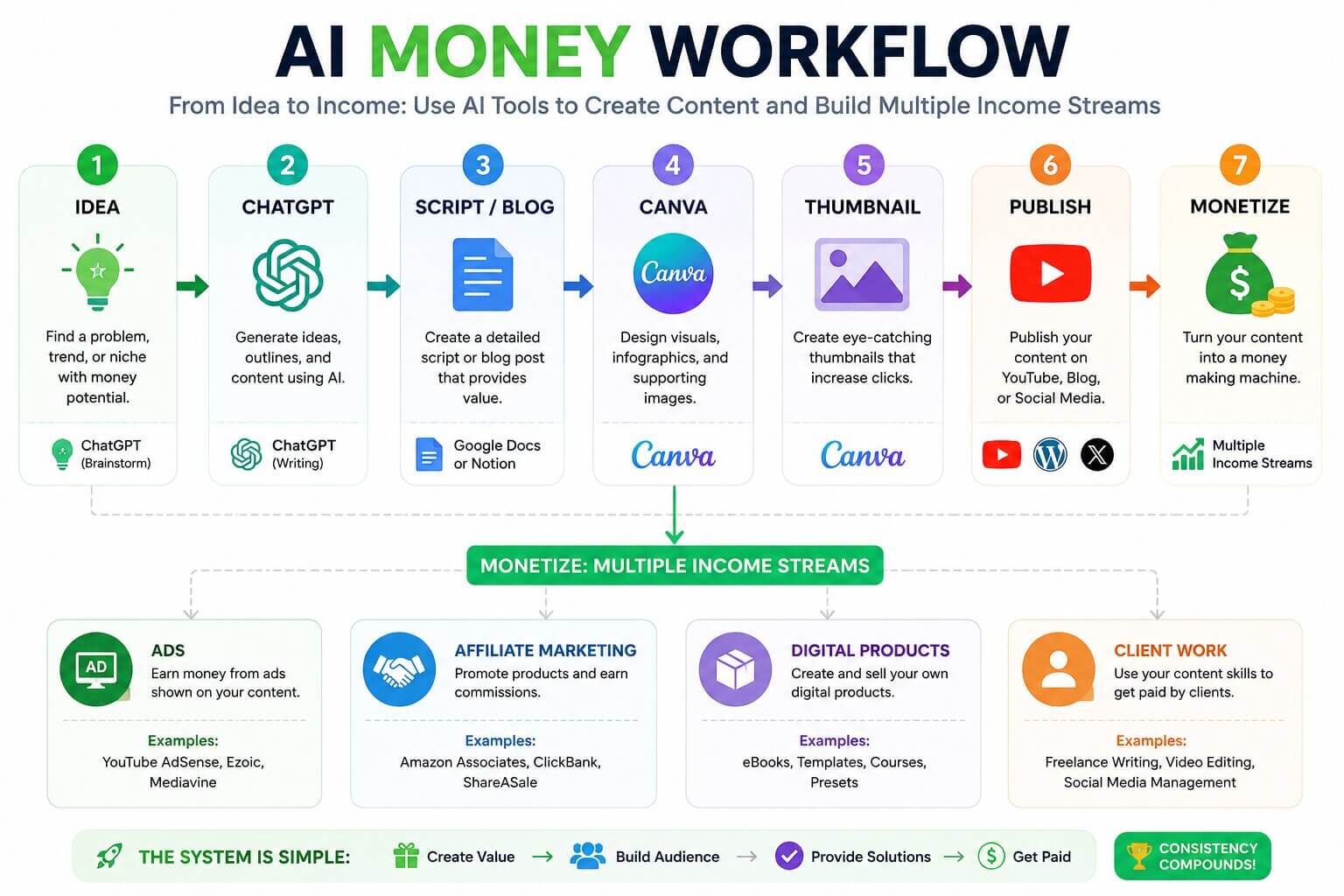
What you can actually do with them
For freelancers: Write blog posts, product descriptions, email sequences, ad copy, and social media content for clients. Many businesses are actively looking to hire people who can deliver fast, well-edited content. You do not need to be an expert writer — you need to understand the client's audience and know how to edit AI output into something human and useful.
For content creators: Draft YouTube scripts, generate video ideas, write SEO outlines, brainstorm hooks, plan content calendars, and create descriptions that help your videos and articles get found.
For digital product creators: Outline ebooks, courses, and prompt packs. AI helps you structure and draft the content much faster, while you focus on the expertise and examples that make the product actually valuable.
For bloggers: Use AI to research topics, generate outlines, write first drafts, and create FAQs — then edit heavily to add your own insight, examples, and voice. Google in 2026 rewards helpful, expert content, not generic AI output.
How Content Marketers Use AI Writing Tools in 2025
% of marketers using AI for each task — Content Marketing Institute 2025
Which writing tool should you use?
Many creators use different LLMs for different tasks: ChatGPT for brainstorming and fast drafts, Claude for longer content and detailed editing, Gemini for Google-integrated research, and Grok for trend-driven social content. The free versions of most of these are enough to start with.
2. AI Design Tools — Because Visuals Decide Whether Anyone Clicks
People judge things fast. A thumbnail, a product page, a social post — the visual quality decides in about two seconds whether someone clicks or keeps scrolling. Before AI design tools, creating good visuals required expensive software and hours of practice. Now, beginners can produce clean, professional-looking graphics without any design background.
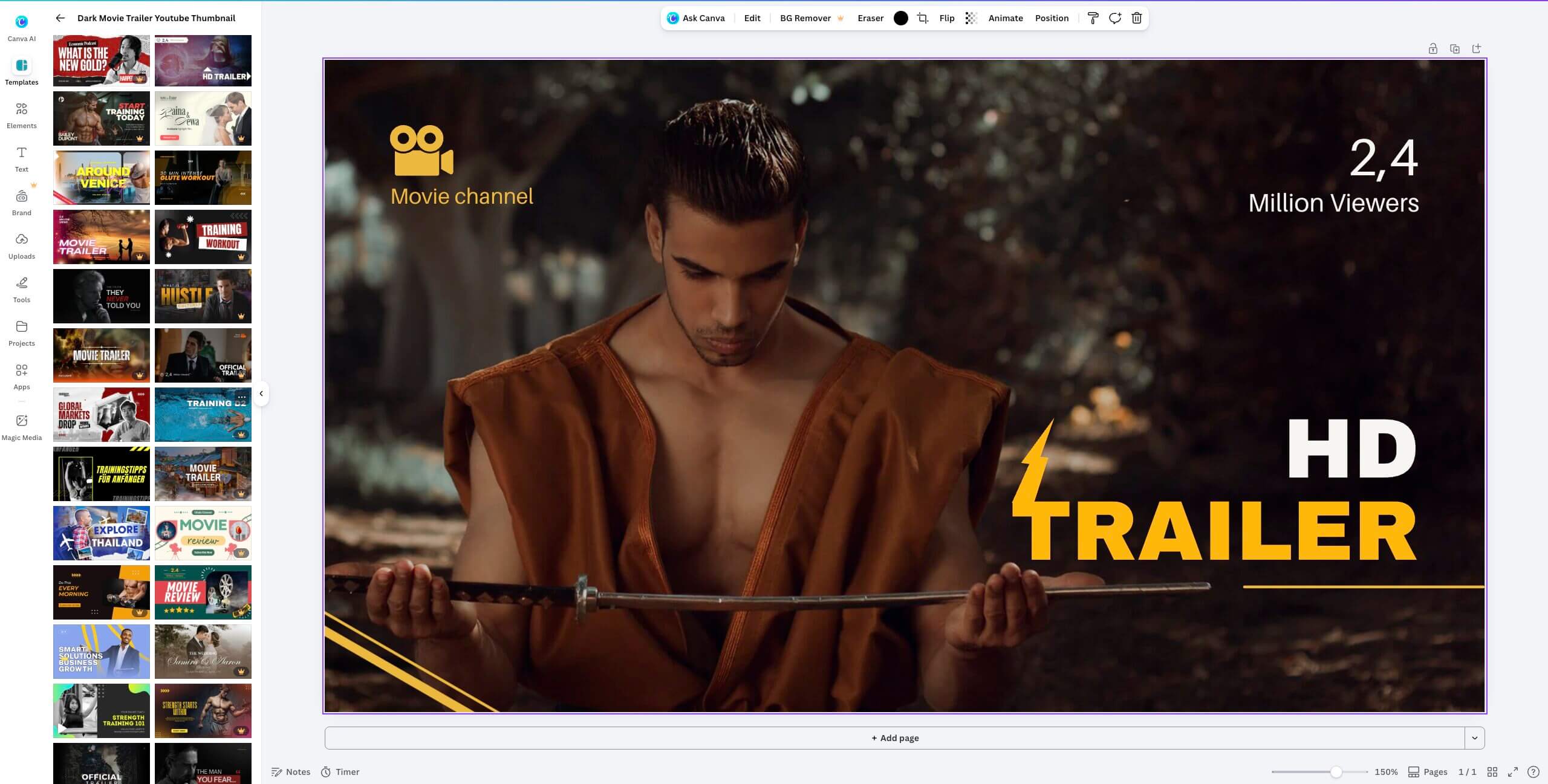
Canva — The best starting point for most beginners
Canva is free to start, easy to learn, and has templates for almost every content type — YouTube thumbnails, Instagram carousels, ebook covers, lead magnets, digital product pages, and presentations. It now includes AI features for text generation, background removal, and image creation — all inside the same interface you are already using to design.
Midjourney and Ideogram — For custom AI images
These tools are used when you need custom AI-generated images — unique visuals that do not exist as stock photos. Common uses include thumbnail concepts for YouTube channels, cover images for ebooks, brand visuals and mood boards for clients, and assets for print-on-demand products.
Where design tools create income
- Offer thumbnail design as a freelance service to YouTube creators — YouTube creators using AI thumbnails saw 25% higher click-through rates
- Create and sell design packs or template bundles on platforms like Etsy or Creative Market
- Build visual content for social media management clients
- Design covers and graphics for your own digital products
3. AI Video and Editing Tools — Where the Creator Economy Shifted
Video is the highest-engagement format online right now — and it used to require expensive equipment, editing software, and a lot of skill to produce consistently. AI tools changed that completely. What once required a team and a full day of editing can now be done by one person in a couple of hours.
The Full AI Video Creation Workflow — From Idea to Published
One person. One day. A complete video using AI tools at every stage. Total time: ~2 hours.
Find topic, validate search demand, gather key facts
Draft hook, structure, and full video script with AI
Create thumbnails, b-roll prompts, AI narration audio
Auto-captions, silence removal, clips assembly
Upload, write SEO description, add tags, schedule
The tools in detail
CapCut is one of the most widely used free video editing tools among creators in 2026. It works on mobile and desktop, automatically generates captions, removes silences, creates short-form clips, and has AI effects built in. For anyone starting a YouTube channel, TikTok page, or Instagram Reels presence, CapCut is the fastest path from raw footage to published video.
Descript works differently — it lets you edit video by editing the transcript text. Delete a sentence from the script and the corresponding video clip disappears. It also removes filler words automatically. This is especially useful for podcasters and educators who record long-form content.
Runway focuses on AI-generated visuals and cinematic effects. Creators use it to generate b-roll footage, apply cinematic filters, remove backgrounds, and create short AI video clips — especially useful for faceless content channels.
The faceless content opportunity
One of the biggest shifts in 2025–2026 has been the growth of faceless AI-assisted content. Channels that produce educational videos, motivational content, narrated stories, and explainer videos — without showing a face — are gaining large audiences across YouTube and TikTok. AI tools handle the voiceover, visuals, captions, and editing. One person with a clear topic and consistent workflow can research, script, produce, and publish a video in a single day.
What AI Actually Does to Your Output — Verified 2025 Data
Productivity gains measured across content creation, freelancing and video production
4. AI Voiceover Tools — Essential for Faceless Content
If you are building any kind of video content without recording your own voice — or if you want to produce content in multiple languages — a voiceover tool is part of your workflow. ElevenLabs is the most widely recommended option for creators right now.
It generates realistic-sounding AI voices in multiple languages and accents, lets you clone your own voice with a few minutes of audio, and produces audio files that can be dropped directly into video editing software.
Common uses
- Narration for faceless YouTube videos
- Voiceovers for explainer content and course videos
- Audiobook production for digital products
- Dubbing content into different languages to reach wider audiences
The free plan has limited credits but is enough to test whether this fits your workflow before upgrading.
5. AI Research Tools — So You Are Not Publishing Wrong Information
Most AI writing tools do not have access to real-time information. They generate text based on training data, which means they can confidently produce outdated or inaccurate details if you are not careful.
Perplexity solves this by combining AI with live web search. Ask a question, get a clear answer with sources linked — no guessing whether the information is current.
For content creators and bloggers, this is useful for
- Researching topics before writing to make sure you have accurate information
- Checking recent statistics or market data before including them in content
- Finding sources to cite in your articles — which adds credibility and helps with SEO
- Understanding what questions people are actually asking about a topic
6. Workflow and Organisation Tools — So Your System Does Not Break Down
Making money online with AI is not just about the content you create — it is about whether you can sustain output consistently over weeks and months. Most beginners start strong and then stall because they have no system. They forget what they were working on, lose track of content ideas, publish inconsistently, and eventually give up.
Notion AI helps prevent this. It is a workspace where you can keep your content calendar, store research, draft ideas, track client work, and build the repeatable SOPs that make a solo creator operate like a small team. The AI layer helps you summarise notes, generate outlines from bullet points, and create first drafts from rough ideas — all inside the same place you are already organising your work.
The Beginner AI Stack — Simplified
Here is the full picture. Every tool mapped to a workflow task, with a note on what is free and what requires a paid plan.
The Complete Beginner AI Stack — 2026 Edition
Every tool mapped to a specific workflow task. Most have free plans.
Writing, scripting, content drafts
ChatGPT / Claude / Gemini
Research with real-time sources
Perplexity
Design, thumbnails, graphics
Canva
AI-generated images
Midjourney / Ideogram
Video editing and captions
CapCut
Advanced video editing
Descript
AI voiceovers
ElevenLabs
Planning and organisation
Notion AI
Key insight:
You do not need all 8 tools on day one. Start with one writing tool + one design tool. That covers 80% of beginner income models. 91% of businesses use AI in 2026 — demand for AI-skilled freelancers is at an all-time high.
Most of these tools have free plans that are enough to start. You do not need paid subscriptions before you are earning anything.
The Real Key: Workflow Beats Tool Count Every Time
This is the section most people skip, but it is the most important one. Knowing which tools exist is not what separates people who earn with AI from people who do not. The real separator is having a repeatable workflow — a clear process you can follow consistently without having to think about it every time.
A simple creator workflow looks like this:
Find a topic people are searching for
Use Perplexity or a basic Google search to understand what your audience is asking. Look at "People Also Ask" sections on Google for real question ideas.
Create the content
Use an AI writing tool to draft a script, article, or outline. Edit heavily to add your own voice, real examples, and useful depth.
Produce the visual or video
Use Canva for graphics, CapCut for video, ElevenLabs for voiceovers if needed.
Publish and distribute
Post to your chosen platform — YouTube, your blog, social media. Include proper titles, descriptions, and tags.
Repeat
Consistency is the actual growth strategy. The internet rewards creators who publish useful content regularly over a long period.
That process — not the tools — is what builds an audience and an income over time.
Common Questions Beginners Ask
The Most Important Thing No One Tells You
Access to AI is no longer an advantage. Everyone has it.
In 2026, the tools are available to millions of people. Free plans exist for almost everything. The barrier to entry is essentially zero.
Which means the real competitive advantage is not which tools you use. It is whether you actually do the work — consistently, with improving quality, over a long enough period.
The creators building real income with AI are the ones who:
- Picked a clear audience and stayed focused on it
- Published content consistently, even when it was not perfect
- Improved their skills — hooks, storytelling, SEO, client communication
- Built systems that let them repeat their workflow without burning out
AI is a multiplier. But it only multiplies what you actually do.
Start small. Pick one income model. Learn one workflow. Get good at it before you add anything else. That is the most reliable path from using AI to earning from it.
READY TO START?
Pick your path and start this week
Earngenix publishes practical, no-fluff guides on how to use AI tools to build real income online. Browse more on the blog.
Stay Connected
Get Weekly AI Income Guides
Every week we publish practical guides on AI tools, workflows, and income strategies — no fluff, just actionable systems you can use the same day.
No spam. Unsubscribe any time.
Join the discussion
Sign in to leave a comment or reply
No comments yet
Be the first to share your thoughts!