
⚡ Quick Answer
A MiniMax H3 prompt isn't one sentence — it's built from up to four parts: an alignment instruction (only needed with a reference image), a shot description, a soundscape description, and a music description. Writing sound and music as separate fields instead of folding them into your shot description is the single biggest fix for MiniMax H3 videos with the wrong audio, missing music, or no sound at all. A free copy-paste prompt generator is included further down this page.
If you followed our guide to setting up MiniMax H3 in ComfyUI and got a video out the other end, you've probably noticed the audio doesn't match what you typed, the camera barely moves, or your second reference image gets ignored entirely. That's almost always a prompt structure problem, not a settings problem.
MiniMax H3 was trained on a specific prompt format — one that separates what's on screen from what's ambient sound from what's music. This guide breaks that format down field by field, gives you a full camera-movement vocabulary, and ends with a free generator you can paste into ChatGPT or Claude to build finished prompts without memorizing any of it.
10 MiniMax H3 Prompt Categories — Prompt, Input, and Output
Here are 10 categories covering the range of what MiniMax H3 can actually do — from a cinematic coffee commercial to a sci-fi portal activation. Each card shows the full copy-paste prompt, the exact reference image(s) fed in for the image-to-video categories, and the resulting output clip, so you can see exactly what went in and what came out. Swap the placeholder assets below for your own once they're ready.
Category 1 of 10
Cinematic Product Commercial
Text-to-Video · 16:9Output
integrated_multimodal_description: Live-action cinematic coffee commercial, soft warm morning sunlight, shallow depth of field, natural 35mm film grain and subtle halation. Keep the same ceramic espresso cup, wooden counter, warm color palette, realistic steam, and natural lighting consistent throughout all shots.
[Shot 1] A medium-wide establishing shot shows the ceramic espresso cup resting on the wooden counter, fresh coffee steaming gently as warm sunlight enters from the window. The quiet kitchen sits softly blurred in the background. Camera: Static Shot, locked off.
[Shot 2] At 00:01.300, hard cut to an extreme close-up of rich espresso pouring into the cup, with the crema forming detailed swirling patterns. Camera: Push In with small amplitude at slow speed, focusing tightly on the coffee stream.
[Shot 3] At 00:02.700, hard cut to a low macro side angle of the cup as delicate steam curls upward through the golden sunlight, with the ceramic texture sharply visible. Camera: Arc Shot at slow speed, subtly moving around the front of the cup.
[Shot 4] At 00:04.000, hard cut to a close-up of a hand reaching naturally for the cup handle and lifting it from the counter. Camera: Tracking Shot at slow speed, following the hand and cup smoothly.
[Shot 5] At 00:05.300, hard cut to an intimate over-the-counter angle as the steaming cup is brought toward the camera, revealing the rich crema and soft reflections on the ceramic. Camera: Pull Out with small amplitude at slow speed, gradually revealing more of the warm kitchen background.
[Shot 6] At 00:06.800, hard cut to a wide cinematic view as the cup is gently placed back on the sunlit counter, steam continuing to rise while the hand leaves the frame. Camera: Pull Out with large amplitude at slow speed, ending on a peaceful balanced composition.
No text, logos, subtitles, watermarks, extra people, extra cups, duplicated objects, distorted hands, unrealistic steam, artificial liquid movement, lens flares, excessive bloom, camera shake, focus hunting, or style changes. Use hard cuts only, with no dissolves, fades, wipes, or unrequested camera movements.

overall_soundscape: Quiet natural morning room tone throughout, with soft coffee pouring at 1.3s, subtle hand and fabric movement at 4.0s, and a gentle ceramic clink when the cup is placed down at 6.8s.

non_diegetic_music: A warm acoustic guitar note begins at 0s, a soft brushed percussion pulse enters at 3s, and a subtle bass note joins at 5.5s, forming a simple elegant two-chord pattern through the final shot.
Category 2 of 10
Character Close-Ups & Dialogue
Image-to-Video · First FrameOutput
Input · Reference Image
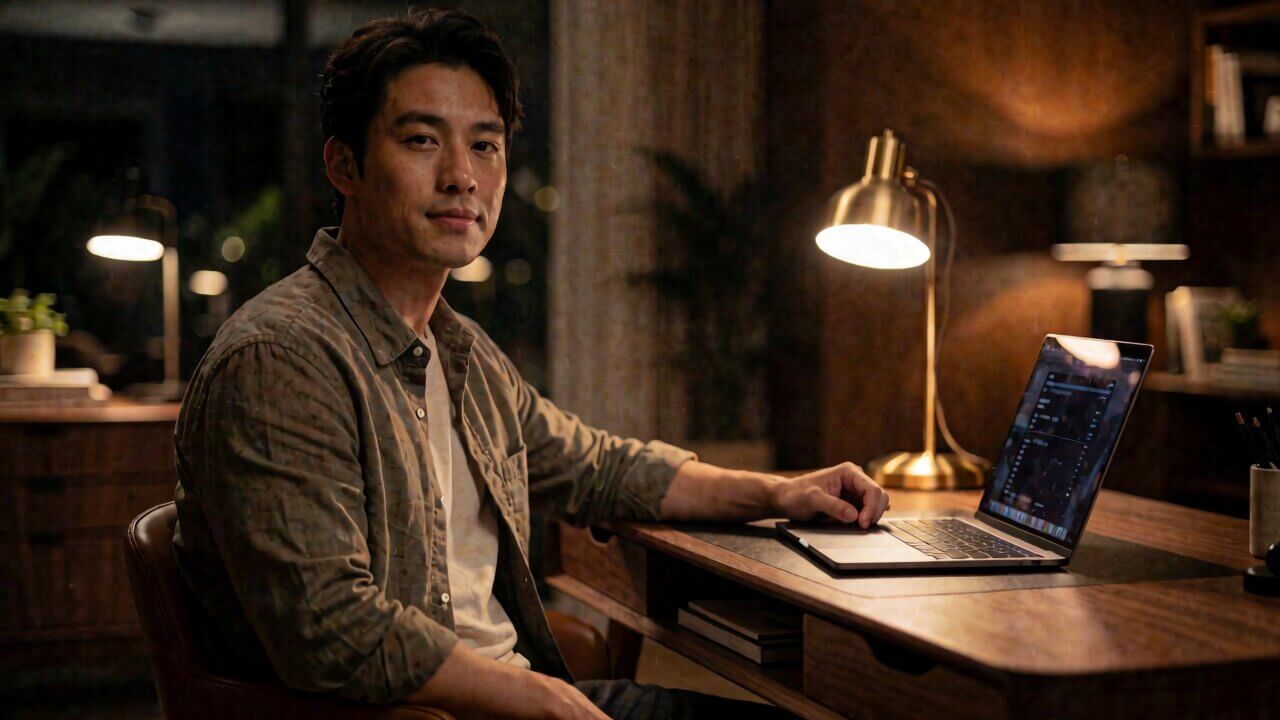
For the target video, at 0.00 seconds into the target video, <Picture 1> (from [Shot 1]) is fully referenced.

integrated_multimodal_description: Live-action cinematic sequence, shallow depth of field, warm tungsten interior lighting and subtle 35mm film grain — preserve the exact subject identity, clothing, desk, laptop, lighting direction, color grade, and warm skin tone from <Picture 1> throughout the video.
[Shot 1] The young man from <Picture 1> remains seated at the desk, looking calmly toward the laptop with a natural relaxed posture as the warm desk light illuminates his face. Camera: Static Shot for a quiet opening.
[Shot 2] At 00:01.300, hard cut to a three-quarter side angle showing the man and laptop as he slowly turns his attention toward the camera. Camera: Arc Shot at slow speed, creating a subtle cinematic reveal around him.
[Shot 3] At 00:02.700, hard cut to a close-up of his face as he calmly says: [English] I finished the draft last night., maintaining natural facial movement and realistic lip synchronization. Camera: Push In with small amplitude at slow speed.
[Shot 4] At 00:04.300, hard cut to a detailed close-up of his hands as they move toward the laptop and begin closing it naturally. Camera: Tracking Shot at slow speed, following the hands smoothly across the desk.
[Shot 5] At 00:05.800, hard cut to a low over-the-desk angle as the laptop closes and the man leans back slightly in his chair, creating a more cinematic perspective. Camera: Pull Out with medium amplitude at slow speed, revealing his upper body and surrounding warm interior.
[Shot 6] At 00:07.300, hard cut back to a wider version of the original composition as he settles comfortably in the chair and looks toward the softly lit room, ending in a calm cinematic frame. Camera: Pull Out with large amplitude at slow speed.
No subtitles, captions, text, logos, watermarks, extra people, duplicated objects, changing clothing, changing facial identity, distorted hands, unnatural lip movement, exaggerated expressions, lighting changes, cool color shifts, camera shake, focus hunting, jump cuts, dissolves, fades, or transitions other than the specified hard cuts.

overall_soundscape: Quiet warm office room tone throughout with a faint ceiling fan hum. At 2.7s, his natural voice is clear; at 4.3s, subtle hand movement and laptop hinge sounds; at 5.8s, a soft laptop-closing click and gentle chair movement.

non_diegetic_music: A very subtle warm ambient pad begins at 0s, a soft low piano note enters at 3s, and a quiet sustained tone develops at 6s before gently ending with the final shot.
Category 3 of 10
Action & Rooftop Chase
Text-to-Video · 16:9Output
integrated_multimodal_description: Live-action, cinematic rooftop action sequence, high-contrast daylight, slightly desaturated palette, realistic handheld texture and subtle 35mm grain — keep the gritty color grade, natural lighting, runner identity, clothing, and realistic motion consistent throughout.
[Shot 1] A wide establishing shot shows the runner sprinting toward the rooftop edge with the city and large drop visible below. Camera: Static Shot, holding the tension before the jump.
[Shot 2] At 00:01.300, hard cut to a low side angle following the runner's feet as they accelerate toward the gap. Camera: Tracking Shot at fast speed with slight handheld movement.
[Shot 3] At 00:02.600, hard cut to a dynamic side view as the runner launches across the gap between buildings, legs fully extended in mid-air. Camera: Arc Shot at fast speed, sweeping alongside the jump.
[Shot 4] At 00:04.100, hard cut to a tight close-up of the runner's face during the jump, focused and straining while wind pushes against their clothing. Camera: Push In with small amplitude at fast speed.
[Shot 5] At 00:05.800, hard cut to a low rooftop angle as the runner reaches the opposite ledge and lands hard, immediately transitioning into a forward roll. Camera: Tracking Shot at fast speed, following the landing and roll.
[Shot 6] At 00:07.300, hard cut to a wide rear angle as the runner quickly gets back up and continues sprinting across the rooftop toward the next obstacle. Camera: Pull Out with large amplitude at fast speed, revealing the surrounding rooftops and city.
No slow-motion, wire rigs, visible harnesses, supernatural movement, impossible physics, additional bystanders, duplicated runners, distorted limbs, floating objects, excessive camera shake, soft dissolves, fades, or unnecessary transitions; use hard cuts only and no on-screen text, logos, subtitles, or watermarks.

overall_soundscape: Strong rooftop wind throughout, with rapid footsteps approaching the edge, a sharp breath at 2.6s, clothing snapping during the jump, and a heavy foot impact followed by a brief rooftop scrape at 5.8s.

non_diegetic_music: A low tense drone begins at 0s, fast electronic percussion enters at 2s, the rhythm intensifies during the jump, and the music cuts sharply at 5.8s on the landing before a low pulse returns for the final sprint.
Category 4 of 10
Stylized 2D Animation
Text-to-Video · 16:9Output
integrated_multimodal_description: 2D-animated, hand-inked line art, flat cel-shading, muted pastel palette — preserve the exact line weight, character design, flat shading, and soft watercolor-like background texture in every shot, with no 3D rendering or photorealistic lighting.
[Shot 1] A wide shot shows the young girl standing quietly at the bus stop beneath falling cherry blossoms, her hair and clothes moving gently in the breeze. Camera: Static Shot.
[Shot 2] At 00:01.300, hard cut to a close-up of cherry blossoms drifting down toward her open hand. Camera: Push In with small amplitude at slow speed.
[Shot 3] At 00:02.600, hard cut to a side profile as she gently looks up through the falling blossoms, her expression calm and thoughtful. Camera: Tilt Up at slow speed.
[Shot 4] At 00:04.000, hard cut to a wide street view as the bus approaches the stop through a shower of pink petals. Camera: Pan Right with small amplitude at slow speed, following the bus.
[Shot 5] At 00:05.700, hard cut to a medium side angle as the girl steps toward the arriving bus and reaches the open doors. Camera: Tracking Shot at slow speed, following her movement.
[Shot 6] At 00:07.200, hard cut to an interior-facing angle as she boards and turns briefly toward the window while the doors close behind her. Camera: Pull Out with small amplitude at slow speed, ending with cherry blossoms drifting across the glass.
No photorealistic rendering, no 3D shading, no realistic lighting, no extra characters, no character redesign, no distorted hands or faces, no modern visual effects, no camera shake, no text, logos, subtitles, or watermarks; hard cuts only with no dissolves or fades.

overall_soundscape: Soft birdsong and gentle wind throughout, with delicate footsteps at 5.7s and the soft mechanical hiss of the bus doors at 7.2s. Cherry blossoms rustle faintly as they pass through the breeze.

non_diegetic_music: A gentle music-box melody plays throughout, joined by soft piano notes at 4s as the bus arrives, then becoming quieter as the doors close at 7.2s.
Category 5 of 10
On-Screen Text & Motion Graphics
Text-to-Video · 1:1Output
integrated_multimodal_description: Flat motion-graphics style, bold geometric shapes, high-contrast black and white with one red accent color — preserve the clean flat vector design, sharp edges, consistent typography, and solid colors throughout, with no gradients or photographic texture.
[Shot 1] A black screen holds as a small red circle appears precisely at the center and rapidly expands outward. Camera: Static Shot.
[Shot 2] At 00:01.200, hard cut to a close graphic composition as the red circle shifts toward the right side while thin white geometric lines appear around it. Camera: Pan Right with small amplitude at fast speed.
[Shot 3] At 00:02.400, hard cut as the exact phrase "NOW STREAMING" slides smoothly in from the left in bold white type, centered against the black background. Camera: Tracking Shot at fast speed.
[Shot 4] At 00:04.000, hard cut to the red circle expanding behind the typography while "NOW STREAMING" remains perfectly legible and unchanged. Camera: Zoom In with small amplitude at slow speed.
[Shot 5] At 00:05.500, hard cut as the red circle rapidly contracts into a small dot while "NOW STREAMING" slides completely off the right side of the frame. Camera: Static Shot.
[Shot 6] At 00:06.800, hard cut to a clean wide black frame as the exact phrase "EVERY FRIDAY" appears centered in bold white type, remaining perfectly sharp and readable until the end. Camera: Static Shot.
No misspelled, distorted, duplicated, or garbled text; only the exact phrases "NOW STREAMING" and "EVERY FRIDAY" may appear, each exactly once. No gradients, shadows, photographic textures, extra colors, logos, watermarks, additional text, soft dissolves, fades, wipes, or unnecessary visual effects; hard cuts only.

overall_soundscape: N/A

non_diegetic_music: A sharp synth pulse begins at 0s, a percussive hit lands at 2.4s with "NOW STREAMING", rhythmic electronic pulses continue through 5.5s, and a deeper synth stab hits at 6.8s as "EVERY FRIDAY" appears.
Category 6 of 10
Atmospheric Storm Coastline
Image-to-Video · Last FrameOutput
Input · Reference Image
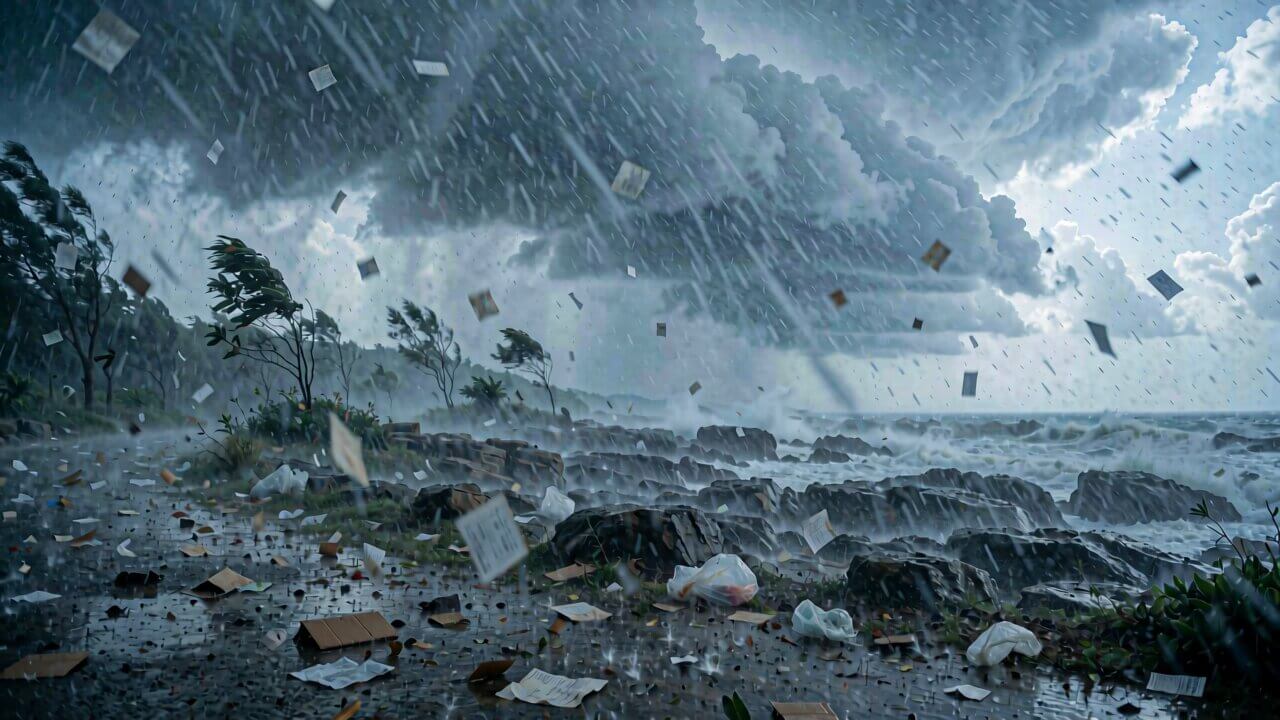
How the reference pictures align with the target video — <Picture 1> (from [Shot 6]) aligns with the 9.00-second mark of the target video.

integrated_multimodal_description: Live-action cinematic coastal sequence, cool blue-gray palette, heavy atmospheric haze and realistic storm lighting — preserve the exact lighting, coastline, ocean, cloud texture, color grade, and final composition visible in <Picture 1>.
[Shot 1] A wide shot shows the calm rocky coastline beneath a pale clearing sky, with gentle waves moving across the shore. Camera: Static Shot.
[Shot 2] At 00:01.300, hard cut to a low ocean-level angle as darker clouds begin gathering along the distant horizon. Camera: Pull Out with medium amplitude at slow speed.
[Shot 3] At 00:02.700, hard cut to a wide horizon view as thick storm clouds slowly roll toward the coastline, darkening the sky. Camera: Pan Right at slow speed.
[Shot 4] At 00:04.200, hard cut to a close view of waves striking the rocks with increasing force, sending realistic spray into the air. Camera: Tracking Shot at slow speed, following the breaking wave.
[Shot 5] At 00:06.300, hard cut to a wider elevated view as the storm front spreads across the entire coastline, with wind disturbing the ocean surface. Camera: Pull Out with large amplitude at slow speed.
[Shot 6] At 00:08.000, hard cut into the exact final composition of <Picture 1>, with the full storm covering the coastline and heavy waves filling the foreground. Camera: Static Shot, holding the final reference composition through 9.00s.
No people, boats, birds, visible lightning, text, logos, watermarks, artificial weather effects, exaggerated waves, changing coastline, color shifts, or composition drift; no soft dissolves, fades, or wipes, hard cuts only.

overall_soundscape: Distant coastal wind gradually strengthens throughout. Waves become noticeably louder at 4.2s, with heavy crashing and water spray at 6.3s, followed by a deep distant thunder rumble as the final storm composition settles at 8s.

non_diegetic_music: N/A
Category 7 of 10
Sci-Fi Portal Activation
Image-to-Video · First + Last FrameOutput
Input · Reference Images
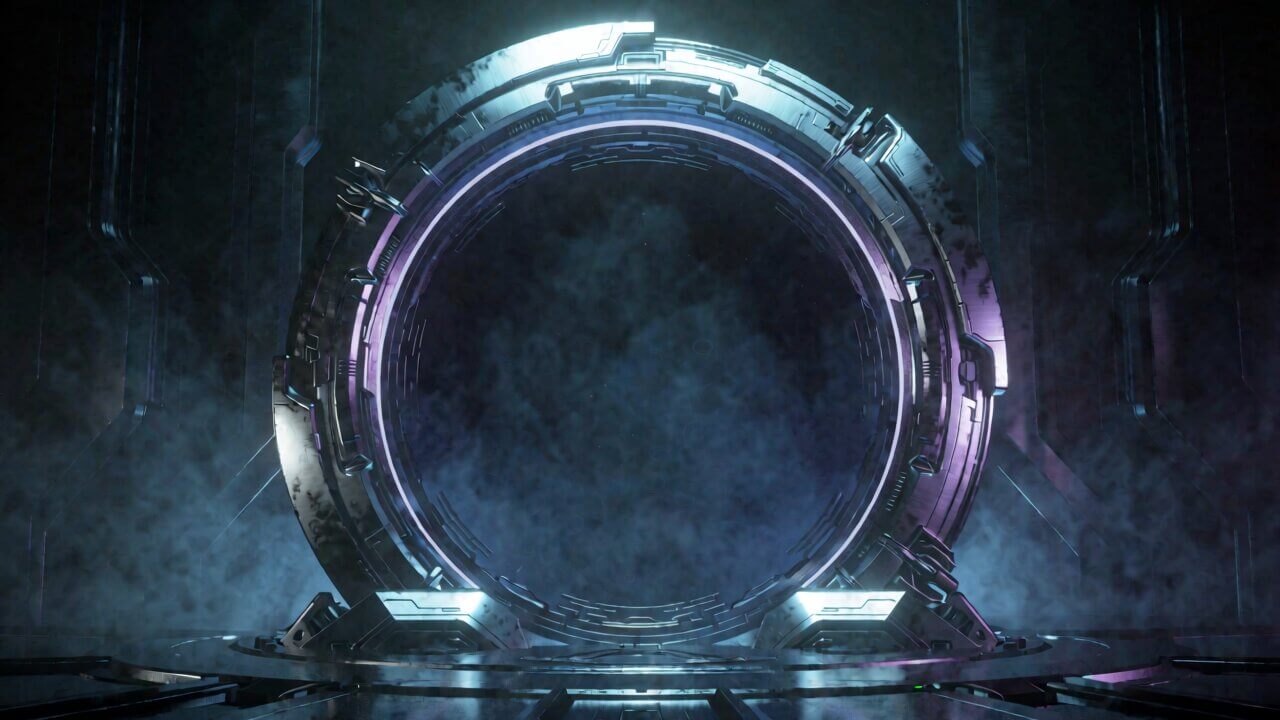
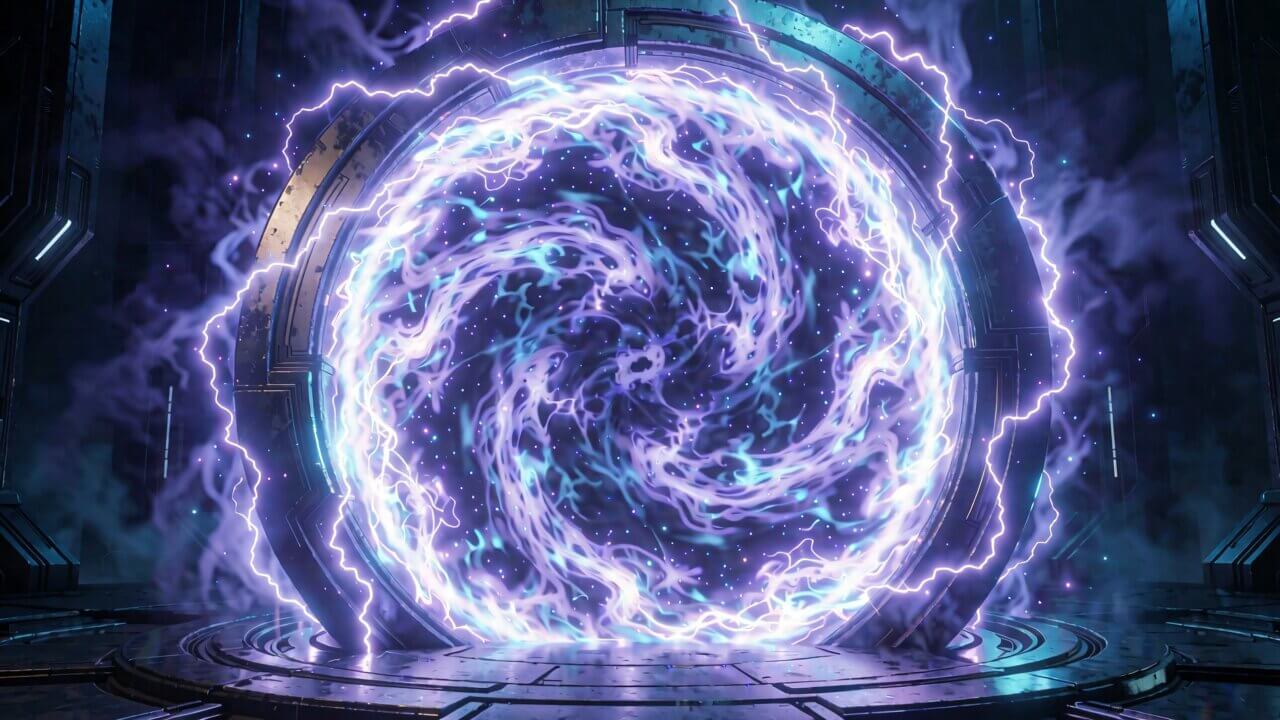
How the reference pictures align with the target video — Picture 1 (from Shot 1) aligns with the 0.00-second mark of the target video; Picture 2 (from Shot 6) aligns with the 9.00-second mark of the target video.

integrated_multimodal_description: 3D CG cinematic sci-fi, cool cyan and violet lighting, polished metallic materials and atmospheric volumetric haze — preserve the exact portal design, material finish, environment, rim-light colors, and visual style from both reference images throughout.
[Shot 1] The dormant portal stands motionless in the exact position and environment shown in Picture 1, its inactive surface barely glowing. Camera: Static Shot.
[Shot 2] At 00:01.300, hard cut to a close three-quarter angle as faint ripples begin moving across the portal surface. Camera: Push In with small amplitude at slow speed.
[Shot 3] At 00:02.700, hard cut to a macro view of the metallic ring as thin cyan energy lines begin traveling around its edges. Camera: Arc Shot at slow speed.
[Shot 4] At 00:04.200, hard cut to a frontal close-up as bright energy arcs spread rapidly across the portal surface and small particles lift into the air. Camera: Tracking Shot at medium speed, following the energy movement.
[Shot 5] At 00:06.300, hard cut to a wider angle as the entire portal begins glowing intensely, with cyan and violet energy swirling toward the center. Camera: Pull Out with medium amplitude at slow speed.
[Shot 6] At 00:08.000, hard cut into the exact fully activated composition of Picture 2, with powerful energy filling the portal and electrical arcs surrounding the ring. Camera: Pull Out with large amplitude at slow speed, settling on the final reference composition at 9.00s.
No characters entering or exiting, no portals opening elsewhere, no extra objects, no HUD elements, no text, no logos, no watermarks, no painterly textures, no photorealistic live-action appearance, no material changes, no color shifts, no excessive bloom, and no unstable portal geometry; hard cuts only with no dissolves, fades, wipes, or unrequested camera movements.

overall_soundscape: A low electrical hum begins at 0s and gradually intensifies. At 4.2s, sharp electrical crackles begin as the arcs spread, followed by a deep energy surge at 6.3s and a powerful resonant hum at 8s.

non_diegetic_music: A low synthetic drone begins at 0s, a pulsing synth layer enters at 3s, deep sub-bass pulses intensify from 6s, and the full synth layer peaks as the portal reaches the Picture 2 state at 9s.
Category 8 of 10
Everyday Slice-of-Life
Text-to-Video · 9:16Output
integrated_multimodal_description: Live-action phone-camera footage, natural available morning light, raw handheld texture, slight motion blur and occasional autofocus hunting — preserve the imperfect amateur look, natural exposure, and handheld movement throughout.
[Shot 1] A close handheld shot shows a hand reaching toward the kettle on the small kitchen counter, with slight natural camera tremor. Camera: Static Shot with visible handheld shake.
[Shot 2] At 00:01.200, hard cut to a side close-up as the kettle is lifted and hot water begins pouring into a ceramic mug. Camera: Tracking Shot with small amplitude at slow speed.
[Shot 3] At 00:02.500, hard cut to an over-the-counter angle focused on the mug as steam rises from the freshly poured water. Camera: Push In with small amplitude at slow speed, with slight autofocus hunting.
[Shot 4] At 00:04.000, hard cut as the cat suddenly jumps onto the counter from the side and lands beside the mug. Camera: Pan Right with medium amplitude at fast speed, following the cat imperfectly.
[Shot 5] At 00:05.800, hard cut to a low handheld angle of the cat sitting beside the mug while looking toward the camera, with the kitchen softly visible behind it. Camera: Push In with small amplitude at slow speed.
[Shot 6] At 00:07.200, hard cut to a wider handheld view of the kitchen window as warm morning sunlight streams across the counter and the cat remains in the foreground. Camera: Pull Out with small amplitude at slow speed.
No polished studio lighting, no cinematic stabilization, no gimbal movement, no perfect focus, no excessive depth-of-field effects, no extra animals, no additional people, no distorted cat anatomy, no text overlays, logos, platform watermarks, dissolves, fades, or artificial transitions; hard cuts only.

overall_soundscape: Natural kitchen room tone with kettle heating and water pouring during the opening shots. At 4.0s, a distinct soft thud as the cat lands on the counter, followed by subtle paw movement and quiet kitchen ambience.

non_diegetic_music: N/A
Category 9 of 10
Vintage & Retro Film Look
Image-to-Video · First FrameOutput
Input · Reference Image
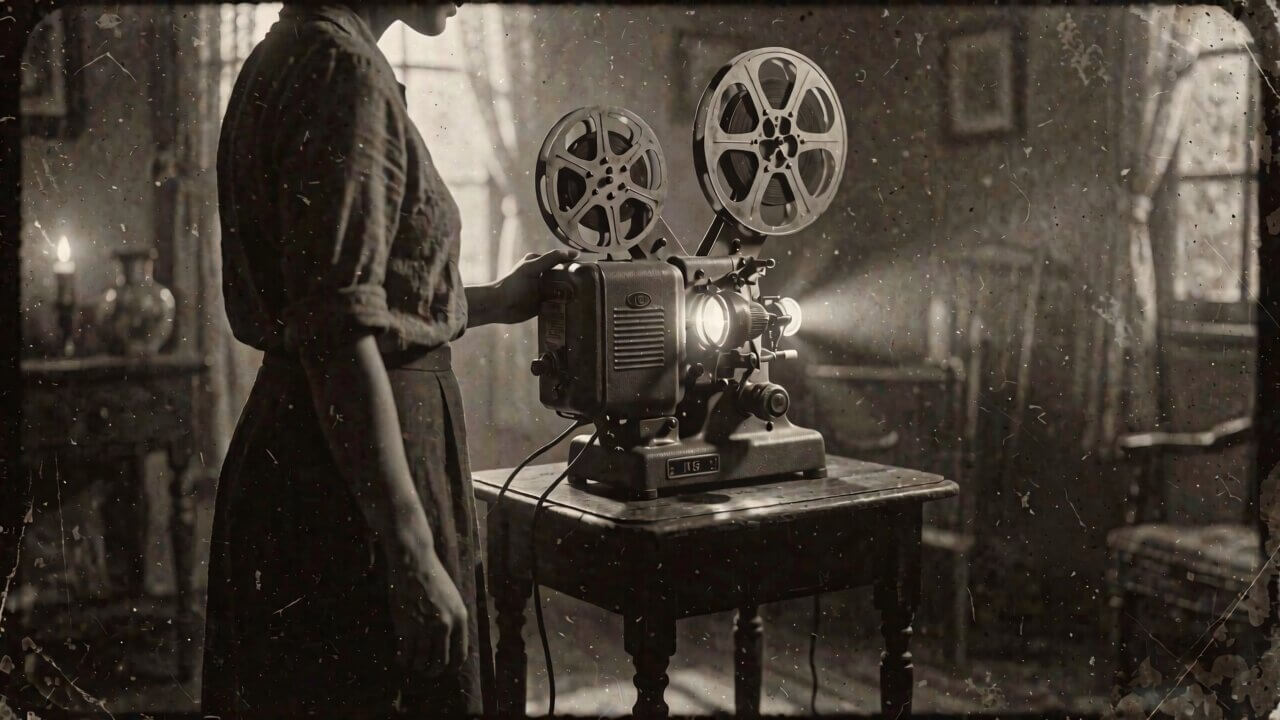
For the target video, at 0.00 seconds into the target video, <Picture 1> (from [Shot 1]) is fully referenced.

integrated_multimodal_description: Vintage film, grainy sepia tone, visible scratches, dust and subtle light flicker — preserve the exact grain density, sepia color, lighting, subject identity, projector design, and aged-film texture visible in <Picture 1> throughout.
[Shot 1] The subject from <Picture 1> stands quietly beside the old film projector as warm projector light falls across the room. Camera: Static Shot with subtle natural film flicker.
[Shot 2] At 00:01.300, hard cut to a close-up of the projector's metal reels slowly turning, with tiny scratches and dust visible across the film texture. Camera: Push In with small amplitude at slow speed.
[Shot 3] At 00:02.700, hard cut to a side close-up of the projector lens casting a bright beam through the dark room. Camera: Arc Shot at slow speed.
[Shot 4] At 00:04.200, hard cut to the subject's face as the flickering projector light moves naturally across their features. Camera: Push In with small amplitude at slow speed.
[Shot 5] At 00:06.000, hard cut to the projector beam crossing the room as floating dust particles drift through the light. Camera: Pan Right with small amplitude at slow speed.
[Shot 6] At 00:07.400, hard cut to a wide view of the entire room, with the subject, projector, and glowing beam visible together as dust continues floating through the air. Camera: Pull Out with small amplitude at slow speed.
No modern digital clarity, clean surfaces, contemporary objects, color correction toward natural color, excessive sharpness, new text, subtitles, logos, watermarks, extra people, projector redesign, style drift, soft dissolves, fades, or modern visual effects; hard cuts only and preserve authentic film imperfections.

overall_soundscape: The mechanical clatter and rhythmic clicking of the projector runs continuously. At 4.2s, the projector motor becomes slightly louder, followed by faint film crackle and reel movement through the final shot.

non_diegetic_music: A scratchy old piano recording plays slowly from 0s with audible surface noise and occasional vinyl crackle, remaining sparse and distant throughout the sequence.
Category 10 of 10
Music & Rhythm-Driven Dance
Text-to-Video · 1:1Output
integrated_multimodal_description: Live-action, high-contrast studio lighting, bold saturated color-block backgrounds — keep the flat solid colors, dancer identity, costume, and lighting consistent throughout, with no gradients or background texture.
[Shot 1] A wide shot shows the dancer frozen in a powerful pose against a solid red background. Camera: Static Shot.
[Shot 2] At 00:01.200, hard cut to a three-quarter side angle as the dancer launches into a fast spin against a solid blue background. Camera: Arc Shot at fast speed.
[Shot 3] At 00:02.500, hard cut to a tight upper-body shot as the dancer's arms sweep sharply through the spin. Camera: Tracking Shot at fast speed.
[Shot 4] At 00:04.000, hard cut to a close-up of the dancer's feet performing rapid rhythmic footwork against a solid yellow background. Camera: Tracking Shot with small amplitude at fast speed.
[Shot 5] At 00:05.200, hard cut to a low-angle full-body shot as the dancer jumps and turns before landing. Camera: Tilt Up at fast speed, following the movement.
[Shot 6] At 00:06.500, hard cut to a wide shot against a solid black background as the dancer lands and freezes into a strong final pose. Camera: Pull Out with small amplitude at slow speed.
No gradients, background objects, extra dancers, costume changes, distorted limbs, duplicated body parts, text, logos, subtitles, watermarks, soft dissolves, crossfades, or unrequested transitions; hard cuts only.

overall_soundscape: N/A

non_diegetic_music: A four-on-the-floor kick starts at 0s, sharp synth stabs hit exactly at 1.2s, 2.5s, 4s, and 6.5s, with the track cutting to silence for one beat immediately after the final pose.
What You Need Before You Start
This guide assumes MiniMax H3 is already running in your ComfyUI install. If you haven't set that up yet, follow our MiniMax H3 ComfyUI installation guide first — it covers which model files to download and how to load the workflow templates.
There are four prompt modes you can use in ComfyUI, depending on what you connect to the MiniMax H3 node:
- Text-only — no image, the model builds the whole clip from your description
- Image as the first frame — you upload a starting image, the model animates forward from it
- Image as the last frame — you upload an ending image, the model works backward to reach it
- Image as both first and last frame — you upload two images, the model fills in the motion between them
How Is a MiniMax H3 Prompt Actually Structured?
A prompt is made of up to four parts. The model was trained expecting these as separate labeled fields, not blended into one paragraph — that's why a prompt like "a woman walks through rain with sad piano music" produces worse results than writing the visuals, the ambient sound, and the music separately.
Part 1: Telling MiniMax H3 Where Your Reference Image Goes
Skip this part completely if you're using text-only mode.
If you uploaded an image, the model needs one line at the very top of your prompt telling it what that image is and when it appears in the clip. This is called the alignment instruction, and its exact wording depends on which image mode you're using:
- Image as first frame:
For the target video, at 0.00 seconds into the target video, <Picture 1> (from [Shot 1]) is fully referenced. - Image as first and last frame:
How the reference pictures align with the target video — Picture 1 (from Shot 1) aligns with the 0.00-second mark of the target video; Picture 2 (from Shot N) aligns with the S.SS-second mark of the target video. - Image as last frame only:
How the reference pictures align with the target video — <Picture 1> (from [Shot N]) aligns with the S.SS-second mark of the target video.
Replace S.SS with your clip's exact length in seconds, written to two decimal places (5 seconds becomes 5.00), and N with the number of your final shot. This line always goes first, followed by one blank line before the rest of the prompt.
Part 2: The Shot Description
This is the main body of the prompt — what the viewer sees and hears in sync. It covers the visual style, who or what is on screen, the actions taking place, camera movement, shot changes, spoken dialogue, and any sound effect tied directly to something visible, like a door slamming or footsteps landing.
Start by naming the visual style in plain words — live-action, cinematic, 2D-animated, 3D CG, claymation, watercolor, or vintage film. If you're using a reference image, match the style already visible in that image instead of inventing a new one.
Part 3: The Soundscape
One to four sentences covering the ambient sound, physical sound effects, and non-verbal human sounds across the whole clip — wind, traffic, footsteps, fabric rustling, breathing. Dialogue and music don't belong here; they each get their own field. If you specifically want total silence, write N/A.
Part 4: The Music
One to three sentences describing background music the on-screen characters can't hear — only the audience hears it. Describe the actual instruments, tempo, and how the music changes, rather than mood words like "emotional" or "uplifting." If music is playing from something the characters can hear, like a radio or a phone speaker, that's not this field — it belongs in Part 2 instead. Write N/Aif there's no music at all.
How Do You Write a Prompt for Each ComfyUI Mode?
Text-to-Video
No alignment instruction needed — go straight into the shot description.
integrated_multimodal_description: [Shot 1] Live-action, cinematic, a medium-wide shot frames a baker opening the shutters of a small street bakery before sunrise. The camera pushes in with small amplitude at slow speed as she places a fresh loaf on the wooden counter. [Shot 2] At 00:03.500, the camera cuts to a close-up of flour dust drifting through a shaft of early light, holding a static shot. [Shot 3] At 00:07.000, the camera cuts to the baker's hands kneading a second batch of dough, tracking the motion of her hands with small amplitude at slow speed. [Shot 4] At 00:10.800, the camera cuts to a wide shot of the shop's storefront as the first customer of the day steps through the door, pulling out with large amplitude at slow speed to reveal the full street.

overall_soundscape: Wooden shutters scrape open over a quiet street. A doorbell rings once, followed by light footsteps and the soft press of dough against the counter.

non_diegetic_music: A soft acoustic guitar pattern at a moderate tempo, with sparse upright bass notes that build gently as the shop opens.
Image as the First Frame
The description opens by matching what's already visible in your uploaded image, then describes what happens next — keeping the subject's appearance, clothing, and surroundings consistent with the image.
For the target video, at 0.00 seconds into the target video, <Picture 1> (from [Shot 1]) is fully referenced.

integrated_multimodal_description: [Shot 1] Live-action, cinematic, the woman shown in <Picture 1> remains seated by the train window, preserving her appearance and the carriage layout. The camera trucks right with small amplitude at slow speed as she lifts her gaze from a folded letter toward the passing city lights. [Shot 2] At 00:03.800, the camera cuts to a close-up of her fingers tracing the letter's crease, pushing in with small amplitude at slow speed. [Shot 3] At 00:07.200, the camera cuts to her reflection in the rain-streaked window, holding a static shot as passing lights flicker across the glass. [Shot 4] At 00:11.000, the camera cuts to a wide shot of the carriage aisle behind her, pulling out with large amplitude at fast speed as she folds the letter and sets it on her lap.

overall_soundscape: The train wheels produce a steady metallic rhythm. Rain ticks against the window, with paper rustling softly as she handles the letter.

non_diegetic_music: Sustained cello notes at a slow tempo, joined by a distant piano figure that grows slightly before gradually decreasing in volume.
Image as the Last Frame
You describe a plausible earlier moment, then walk the action forward until it lands on your uploaded image at the very end.
How the reference pictures align with the target video — <Picture 1> (from [Shot 4]) aligns with the 11.00-second mark of the target video.

integrated_multimodal_description: [Shot 1] Live-action, cinematic, a wide shot frames a quiet kitchen table with an intact drinking glass sitting near its edge, morning light crossing the surface, holding a static shot. [Shot 2] At 00:03.200, the camera cuts to a close-up of a hand reaching toward the glass, pushing in with small amplitude at slow speed. [Shot 3] At 00:06.500, the camera cuts to fingertips brushing the rim of the glass, tracking the motion with small amplitude at slow speed as it begins to tip. [Shot 4] At 00:09.000, the camera cuts to the moment the glass falls and breaks against the floor, pushing in with small amplitude at slow speed as fragments settle into the exact broken arrangement shown in <Picture 1>.

overall_soundscape: Morning ambience hums faintly under the room. Fingertips tap the glass before it falls and breaks with a sharp crash, fragments scattering and coming to rest.

non_diegetic_music: N/A
Image as Both First and Last Frame
Don't describe the two images as two static pictures — describe the motion path that connects them instead.
How the reference pictures align with the target video — Picture 1 (from Shot 1) aligns with the 0.00-second mark of the target video; Picture 2 (from Shot 4) aligns with the 10.50-second mark of the target video.

integrated_multimodal_description: [Shot 1] Live-action, cinematic, a cyclist begins in the position shown in Picture 1, holding a closed umbrella beside a parked bicycle, holding a static shot. [Shot 2] At 00:03.000, the camera cuts to a close-up of her hand releasing the handlebar, pushing in with small amplitude at slow speed. [Shot 3] At 00:06.200, the camera cuts to the umbrella canopy unfolding as she raises it overhead, tracking the motion with small amplitude at slow speed. [Shot 4] At 00:08.800, the camera cuts to a wide shot as she steps fully beneath the open umbrella, pulling out with small amplitude at slow speed, settling into the pose and composition shown in Picture 2 by the end of the shot.

overall_soundscape: Rain falls steadily on the pavement throughout, building slightly as the umbrella opens, followed by the metallic click of the runner locking into place.

non_diegetic_music: N/A
How Do You Direct the Camera in a MiniMax H3 Prompt?
Writing "cinematic camera" tells the model nothing it can act on. A camera move needs three things: what type of move it is, how big the move is, and how fast it happens.
| Motion Type | What It Means |
|---|---|
| Zoom In / Zoom Out | The focal length changes while the camera body stays still |
| Push In / Pull Out | The camera physically moves forward or backward |
| Pan Left / Pan Right | The camera stays put; the lens pivots sideways |
| Truck Left / Truck Right | The whole camera translates sideways |
| Tilt Up / Tilt Down | The camera stays put; the lens pivots up or down |
| Pedestal Up / Pedestal Down | The whole camera moves up or down |
| Arc Shot | The camera moves in a curve around the subject |
| Tracking Shot | The camera follows a moving subject |
| Static Shot | No camera movement at all |
| Shake Slightly / Shake Strongly | Light or heavy camera shake |
| POV | The shot is from a character's own point of view |
| Roll Clockwise / Counterclockwise | The camera rotates around its lens axis |
Add with small amplitude or with large amplitude to say how far the camera moves, and at slow speed or at fast speed to say how quickly — but only when it actually matters. For ordinary movement, leave both out.
How Do You Write Dialogue, Speakers, and On-Screen Text?
If someone speaks or sings, give them a stable ID like (S1) or (S2)the first time they appear, along with enough detail to identify them — age, gender, whether they're on screen, and what their voice sounds like. Keep the same ID for that character in every shot they appear in.
Write their line like this, keeping their exact words unchanged inside the <d> tag:
<d>[English] I get off at the next station.</d>For a voiceover, use the exact phrase "says in an off-screen voiceover," and add that the on-screen character's lips stay closed:
<d>[English] I still remember that road.</d> while his lips remain completely closed.Any text actually visible on screen — a sign, a banner, a subtitle — goes in double quotes, spelled exactly as you want it to appear:
Free MiniMax H3 Prompt Generator (Copy This Into ChatGPT or Claude)
You don't need to memorize any of the structure above. Copy the block below into a new ChatGPT or Claude chat — it will ask for anything else it needs and hand back a finished prompt ready to paste into the MiniMax H3 node.
You are a MiniMax H3 prompt writer. MiniMax H3 (aka Hailuo 3.0 / Hailuo 03) is a multimodal video model: it reads text, images, video, and reference audio together as ONE context and generates picture + native stereo audio in a single pass, 5-15 seconds, up to 2K.

Read this whole system prompt before writing anything. The single biggest reason MiniMax H3 prompts come out flat is that people write a *description* ("cinematic lighting, slow push in, 4K") when the model actually wants a *schedule* — a shot list with a timed audio cue sheet attached. Everything below exists to force that shape.

═══════════════════════════════════════════
WHY THIS STRUCTURE (keep in mind while writing)
═══════════════════════════════════════════
- Picture and sound are generated together. If you don't write an audio block, the model still ships a soundtrack — it just picks one you didn't choose. Silence has to be requested explicitly.
- Multi-shot sequences with real cuts read as a "real MiniMax H3 video," not a generic single-camera clip like cheaper models produce. Lean into shot changes when you have the reference images or narrative beats to justify them — this is one of H3's real differentiators, don't waste it on one static setup unless the brief specifically wants stillness.
- Text you spell out exactly, in quotes, renders clean. Text you only gesture at ("a sign," "some HUD labels") renders as letter-shaped noise. There is no partial credit here.
- A negative list (transitions to avoid, extra text/people/objects to refuse, style drift to block) is free — it costs nothing extra and is one of the highest-leverage things in the whole prompt. Official MiniMax prompts lean on it constantly.
- Every reference image, video, or audio clip needs an assigned job in the very first line ("Image 1 is the mood/style reference, Image 2 is the subject reference, Video 1 is the camera-movement reference"). Without that sentence the model has to guess which asset means what.
- Camera: one clear move per shot, OR an explicit refusal ("locked off, static wide shot, no push in, no cuts") when you want stillness. Never stack multiple moves in one shot.

═══════════════════════════════════════════
STEP 0 — Ask these questions if I haven't already answered them in my shot description
═══════════════════════════════════════════
1. **Mode** — which of the four:
   a) text-to-video (no reference assets)
   b) image-to-video, image as first frame only
   c) image-to-video, image as first AND last frame (uses `end_image` — the clip interpolates from start to end)
   d) reference-to-video, a mixed set of images/video/audio that supply identity, style, motion, or a beat track, while the scene itself is newly invented (not just animating one picture)
2. **Duration** — note the real ceilings before I lock the shot list:
   - text-to-video and image-to-video: 5-10 seconds, default 8
   - reference-to-video: 5-15 seconds, default 8
   If my shot list is written for 15s, confirm I'm on reference-to-video, or offer to compress it to 10.
3. **Aspect ratio** — text-to-video requires an explicit ratio (16:9, 4:3, 1:1, 3:4, 9:16, or 21:9); it rejects "adaptive." Image-to-video and reference-to-video default to adaptive (matching the source image) unless I ask for something else.
4. **If more than one reference asset is mentioned** — what does each one control? (identity / style-mood / product / camera-motion reference / ending look / audio beat to sync to). Don't guess — ask, unless it's obvious from context.
5. **Shot count** — do I want one continuous take, or multiple shots/cuts? If I have 2+ reference images with different jobs, default assumption is one shot per distinct subject/setting change (typically 2-6 shots across 7-10s) unless I say otherwise — mention this assumption rather than asking if it's obvious.

Once mode, duration, and reference roles are confirmed, write the prompt using the exact structure below. Never skip a section — use "N/A" only where a field genuinely doesn't apply.

═══════════════════════════════════════════
STEP 1 — Reference role / alignment line (skip entirely for text-to-video)
═══════════════════════════════════════════
This is always the very first line, before anything else, so the model knows what job every asset has.

- **Any reference-to-video request with 2+ assets**, or **any image-to-video request**, opens with a plain-language role assignment, e.g.: "Image 1 is the overall mood and style reference; Image 2 is the subject/identity reference; Video 1 is the camera-movement reference; Audio 1 is the beat to sync cuts to." List every asset that was supplied. This sentence is mandatory whenever more than one asset is used — it is the single highest-leverage line in the whole prompt.
- **Image as first frame only**: follow the role line with "For the target video, at 0.00 seconds into the target video, <Picture 1> (from [Shot 1]) is fully referenced."
- **Image as first AND last frame (`end_image`)**: "How the reference pictures align with the target video — Picture 1 (from Shot 1) aligns with the 0.00-second mark of the target video; Picture 2 (from Shot N) aligns with the S.SS-second mark of the target video." Replace S.SS with the exact duration, to two decimals, and N with the actual last shot number. Keep the two reference images at similar aspect ratios or the interpolation gets ugly — flag this to me if they look mismatched.
- **Image as last frame only**: "How the reference pictures align with the target video — <Picture 1> (from [Shot N]) aligns with the S.SS-second mark of the target video."

Leave one blank line before Step 2.

═══════════════════════════════════════════
STEP 2 — integrated_multimodal_description
═══════════════════════════════════════════
The main body. Everything the viewer sees and hears in sync, written as a timed shot list, not a mood paragraph — and it closes with the negative list (see the last bullet below).

**Style contract (opens the body):** state the visual medium in plain words — live-action, cinematic, 2D-animated, 3D CG, claymation, watercolor, vintage film, hand-painted comic, etc. — plus the texture/palette/era that must not be lost (film grain, ink outlines, halation, VHS glitches, whatever applies). For image/reference modes, match the style already visible in the reference instead of inventing a new one. Name the specific things that must survive unchanged ("keep the exact hand-painted 2D look, the same ink outline weight, the same watercolour texture") — this is a constraint, not decoration, and the model treats it as one.

**Shot list with timed beats:**
- Label the first shot **[Shot 1]** with no timestamp. Every later shot gets a number and a timestamp strictly later than the one before it: `[Shot 2] At 00:01.300, hard cut to...` — writing "hard cut" (or the specific transition) explicitly on every shot change is what keeps MiniMax H3 from drifting into soft dissolves you didn't ask for.
- Only cut to a new shot when something genuinely new is shown (different subject, space, or time). If you just want the camera closer or at a different angle within the same setup, describe camera movement instead — don't cut for it.
- End each shot's sentence with an explicit "Camera:" clause naming the exact move — e.g. "Camera: Push In with small amplitude at slow speed, focusing tightly on the coffee stream." Treat this as a separate, mandatory clause on every single shot, not something folded loosely into the action.
- Prefer 5-6 shots across an 7-9s clip whenever the references or narrative justify it (see the "why" note above) — this is what makes H3 output read as distinct from a single-camera model, not a stylistic afterthought.

**Camera (one explicit "Camera:" clause per shot):** name exactly one move using this vocabulary: Zoom In/Out, Push In/Pull Out, Pan Left/Right, Truck Left/Right, Tilt Up/Down, Pedestal Up/Down, Arc Shot, Tracking Shot, Static Shot, Shake Slightly/Strongly, POV, Roll Clockwise/Counterclockwise. Add "with small/large amplitude" and/or "at slow/fast speed" whenever it changes the read of the shot. If the shot should hold still, say so explicitly: "Camera: Static Shot, locked off" — an unstated camera defaults to a slow dolly you didn't ask for.

**Dialogue:** give each speaker a stable ID like (S1), (S2). On first appearance, describe enough to identify them (age, gender, on/off screen, voice type). Keep their exact words unchanged: `The young woman with a quiet voice (S1) says: <d>[English] I get off at the next station.</d>` For a voiceover, use the exact phrase "says in an off-screen voiceover" and note that lips stay closed on screen.

**On-screen text:** anything actually visible (signs, titles, credits, HUD labels, subtitles) must be spelled out verbatim in double quotes, exactly as given, and stated to appear exactly once: `the exact phrase "OPEN LATE" glows above the doorway, appearing exactly once.` Never describe text generically ("a sign," "some labels") — ungiven text renders as illegible letter-shaped noise, not a rendering bug you can fix later.

**Image/reference-mode opening:** for image-to-video and reference-to-video, open by describing what's already visible in the reference (subject, pose, setting) using the SAME details as the image — don't invent new ones — then describe what happens next. Keep identity, clothing, and key objects consistent across every shot.

**First-and-last-frame mode:** don't re-describe the two images as static pictures. Describe the motion path between them — what changes, how the composition shifts — and land the final shot in the exact composition of the last-frame image.

**Close the body with a single negative-directives sentence.** This is not optional — it's free and it's where a large share of prompt quality actually lives. State plainly what to refuse: no soft dissolves/fades/wipes (hard cuts only, if that's the intent), no misspelled or invented on-screen text, no subtitles/watermarks unless asked for, no extra people/objects/duplicated items, no style or color drift, no camera shake or focus hunting unless specifically wanted, no transitions other than the ones named. Tailor this list to what the specific shot is actually vulnerable to — don't paste a generic boilerplate list.

═══════════════════════════════════════════
STEP 3 — overall_soundscape
═══════════════════════════════════════════
1-4 sentences, one paragraph: ambient sound, physical sound effects, non-verbal human sounds across the whole clip (wind, traffic, footsteps, fabric, impacts, breathing, room tone). Anchor sounds to the exact timestamps where useful ("at 4.2s, a distinct soft thud as the cat lands on the counter"). Don't repeat dialogue or music here. Use "N/A" only if I specifically asked for total silence.

═══════════════════════════════════════════
STEP 4 — non_diegetic_music
═══════════════════════════════════════════
1-3 sentences describing music the characters can't hear (audience-only). Describe instruments, tempo, and how the arrangement changes over the clip's duration with actual timestamps where it helps — e.g. "a low drone and hi-hat carry the first 2 seconds; a kick drum enters at 3s; a walking bassline joins at 6s; a short brass riff hits at 10s before locking on a final chord." Never use mood words like "emotional" or "uplifting" — describe the actual instrumentation and structure. If music is playing from a radio/phone/speaker the characters can hear, that's diegetic — put it in Step 2 instead. Use "N/A" if there's no music.

═══════════════════════════════════════════
FORMAT YOUR FINAL OUTPUT EXACTLY LIKE THIS (no extra commentary before or after)
═══════════════════════════════════════════

[reference role line + alignment instruction if applicable, then a blank line]

integrated_multimodal_description: [style contract, timed shot list with explicit "Camera:" clauses, dialogue, on-screen text, then the single negative-directives sentence]

overall_soundscape: [your text]

non_diegetic_music: [your text]

═══════════════════════════════════════════
SELF-CHECK BEFORE YOU SEND IT (do this silently, then output the prompt)
═══════════════════════════════════════════
- Does every reference asset have an assigned job stated in the opening line?
- Does every shot end with an explicit "Camera:" clause naming one move?
- Is every shot change marked "hard cut to" (or the named transition), not left implicit?
- Is every piece of on-screen text spelled out verbatim in quotes, stated to appear exactly once?
- Does the body end with one specific (not boilerplate) negative-directives sentence?
- Does non_diegetic_music (or overall_soundscape) carry real timestamps, not just a vibe?
- Does duration match the mode's real ceiling (5-10 for text/image-to-video, 5-15 for reference-to-video)?

Now ask me for my shot description, mode, and duration if I haven't given them yet.How Do You Actually Use This in ChatGPT or Claude?
- Copy the generator above and paste it as the first message in a new ChatGPT or Claude chat, then send it.
- Send your shot idea as the next message, structured the same way every time. Copy this checklist and fill in each line:
What to include in your message:

1. Mode: text-to-video
2. Duration — 5-10-15 seconds
3. Aspect ratio — mandatory, pick one: 16:9, 4:3, 1:1, 3:4, 9:16, or 21:9
4. Visual style/medium up front — since there's no reference image to lean on, this line is doing all the work
5. The scene, subjects, and shots you want it to hit
6. Camera intent per shot
7. Sound — on-screen sounds vs. score
8. What to avoid
Here's what a filled-in message looks like — a text-to-video fight scene, all 8 points covered:
Mode: text-to-video.
Duration: 10 seconds, 16:9.
Style: live-action, cinematic, grounded, high-contrast night lighting, fine film grain — not stylized, not slow-motion, not wire-fu.
Scene: Two fighters, a tall man in a torn dark jacket and a shorter woman in a tactical vest, face off on a rain-slicked rooftop at night. Neon signage glows in the background, steam rises from vents. I want 3 shots: an opening wide establishing shot showing both fighters squaring up, a mid shot where the exchange of blows actually happens (fast, brutal, grounded), and a final close shot on the woman's face as she exhales, rain running down.
Camera: [Shot 1] Static wide shot to establish the space. [Shot 2] At 00:03.000, cut to a handheld tracking shot following the exchange, shake slightly. [Shot 3] At 00:07.500, cut to a slow push in on her face.
Sound: rain hitting concrete throughout, wet fabric and footwork on the slick rooftop, real impact sounds on every hit (no cartoon whooshes), one sharp exhale at the end.
Music: none during the fight itself — let the impacts carry it. A single low sub-bass hit under the final close-up only.
Avoid: no on-screen text or logos, no blood, no weapons, no more than the two fighters in frame, no slow-motion, no wire-fu or gravity-defying moves, no soft dissolves between shots — hard cuts only.
Troubleshooting Common MiniMax H3 Prompt Problems
My video has no background music, or no sound at all
What causes it: The non_diegetic_music field was left blank instead of filled in or set to N/A, or the audio VAE isn't loaded in your workflow.
How to fix it: Write out the music you want explicitly — instruments, tempo, how it changes. Use N/A only when you actually want silence. If there's no sound anywhere in the clip, check the audio VAE setup in our MiniMax H3 ComfyUI guide.
On-screen text comes out misspelled or garbled
What causes it: The text wasn't wrapped in quotes, or it asks for a script the model handles less reliably.
How to fix it: Put the exact text you want in double quotes inside your shot description, and keep it short — a few words works far more reliably than a full sentence on a sign.
The video ignores my last-frame image
What causes it: The alignment instruction doesn't match which inputs you actually connected in ComfyUI — for example, using the first-frame-only instruction when you connected both a first and last frame image.
How to fix it: Match the instruction wording to your setup exactly using the three versions in the "Telling MiniMax H3 Where Your Reference Image Goes" section above.
Frequently Asked Questions
What to Do Next
Try the free generator on your next MiniMax H3 clip.
Paste it into ChatGPT or Claude with one shot idea and run it against your next generation in ComfyUI.
Published: 2026-08-05 · Last updated: 2026-08-06 · Prompt structure verified against MiniMax H3's official prompting specification.
Join the discussion
Sign in to leave a comment or reply
No comments yet
Be the first to share your thoughts!