
⚡ Quick Answer
For most people running ComfyUI locally, LTX-2.3 is the best all-around local AI video model for both text-to-video and image-to-video — it's the fastest of the three, runs on the least VRAM (8GB+ with GGUF), and is the only model that generates synced audio with the video. If photorealistic humans or believable physics are your priority — for T2V or animating a reference photo — and you have 16GB+ VRAM, WAN 2.2 produces the strongest results. HunyuanVideo 1.5 is roughly a year old at this point, and with LTX-2.3 and WAN 2.2 both having moved on since, it no longer leads any category here — it's still usable, but there's no longer a clear reason to reach for it over the other two.
Picking the best local AI video model between LTX-2.3, WAN 2.2, and HunyuanVideo 1.5 comes down to three questions: how much VRAM do you have, what does your video need to look like, and do you need audio. All three do both text-to-video (T2V) — generating a clip from a prompt alone — and image-to-video (I2V) — animating a reference photo — so this comparison covers both modes rather than treating them as separate decisions. It runs all three through the same categories — VRAM, speed, realism, stylized output, camera motion, physics, audio, and licensing — so you pick the right one before downloading 20GB+ of the wrong model.
All three run natively in ComfyUI with official or community-maintained nodes. If you haven't installed ComfyUI yet, install ComfyUI first before downloading any of the models below.
What You Need Before You Start
Check your GPU's VRAM before picking a model — this decides which one is even usable on your hardware, before quality enters the conversation. VRAM needs are the same whether you're generating text-to-video or image-to-video.
VRAM tiers across all three models
Quantization, in plain terms, is a compressed version of a model file — GGUF and FP8 formats trade a small amount of quality for a much smaller file size and lower VRAM use. All three models publish quantized versions.
For a full GPU buying guide across all three models — which card to buy at each budget, running on 8GB VRAM, fixing "CUDA out of memory" errors, and AMD/Apple Silicon/cloud rental options — see the VRAM & Hardware Guide for AI Video Generation.
LTX-2.3 vs WAN 2.2 vs HunyuanVideo 1.5 at a Glance
A fast top-level scan before the category-by-category breakdown below. Note that all three support both text-to-video and image-to-video — this isn't a text-to-video-only comparison.
| LTX-2.3 | WAN 2.2 | HunyuanVideo 1.5 | |
|---|---|---|---|
| Developer | Lightricks | Alibaba | Tencent |
| Parameters | 22B | 5B / 14B | 8.3B |
| Text-to-video (T2V) | ✅ Yes | ✅ Yes | ✅ Yes |
| Image-to-video (I2V) | ✅ Yes | ✅ Yes | ✅ Yes |
| Min VRAM | 8GB (GGUF) | 12GB (block swap) | 14GB (offloaded) |
| Comfortable VRAM | 16GB+ (FP8) | 24GB (14B, no offload) | 24GB |
| Native audio | ✅ Yes | ❌ No | ❌ No |
| Speed (relative) | Fastest | Slow (fast w/ Lightning LoRA) | Middle |
| Best for | Speed, low VRAM, audio | Photorealism & natural physics (T2V + I2V) | Legacy option — no longer leads a category |
| License | Open weights, commercial use permitted | Apache 2.0 | Tencent Community License (restricted) |
Which Model Is Fastest?
LTX-2.3 is roughly 2–3x faster than WAN 2.2 or HunyuanVideo 1.5 at comparable settings, in both T2V and I2V. On an RTX 4090 with the FP8 distilled model at 8 steps, LTX-2.3 generates a 5-second clip in 20–40 seconds.
HunyuanVideo 1.5 sits in the middle — its smaller 8.3B parameter count (versus the older 13B HunyuanVideo) is specifically what made single-GPU generation practical, but it's still slower than LTX-2.3's distilled pipeline.
WAN 2.2 is the slowest of the three at standard settings — a full 14B render with 20+ steps can take 40–50 minutes for a single 5-second clip, for either mode. With the community Lightning LoRA — a distilled step-reduction LoRA that cuts sampling to 4 steps per expert model — that drops to roughly 1–3 minutes, closing most of the speed gap.
See Each Model's Own Text-to-Video Showcase
Before the matched-prompt breakdown below, here's each model's own T2V demo clip from its dedicated setup guide — these use different prompts per model, so treat them as "what this model looks like at its best," not a direct comparison.
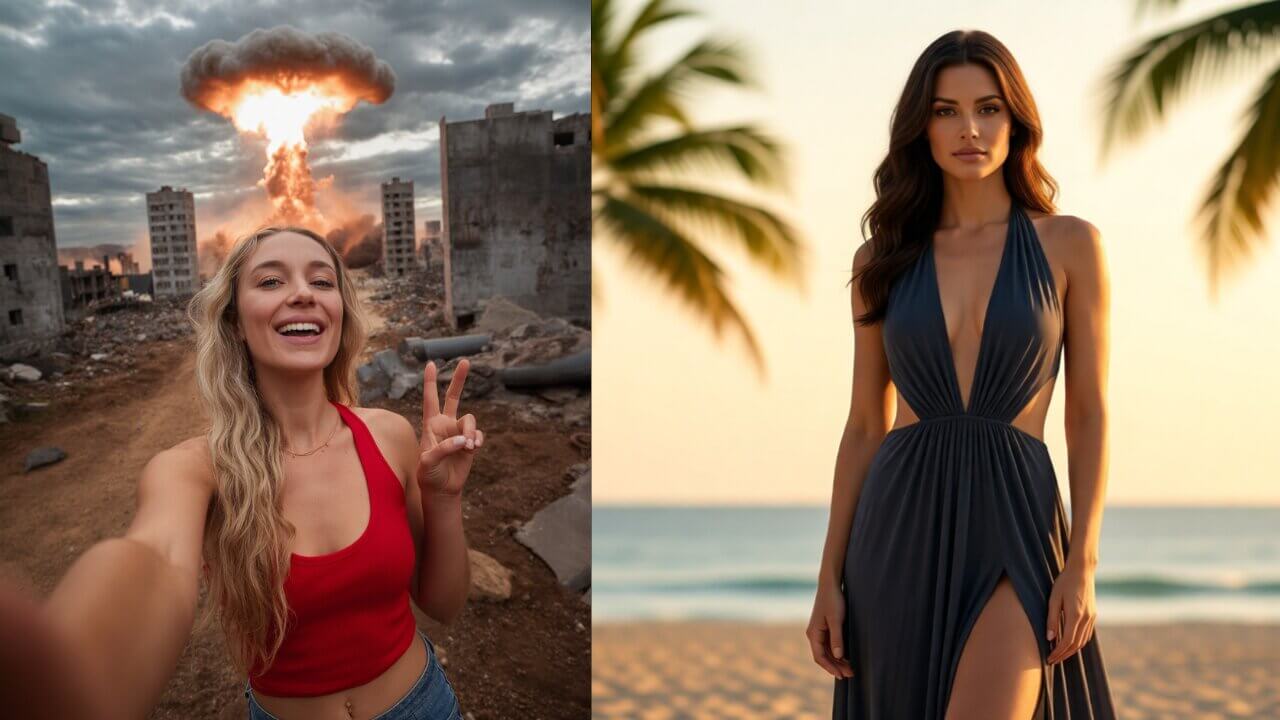
Image-to-Video Compared: Animating a Reference Photo
This is the category most text-to-video-only comparisons skip — but all three models here ship a dedicated I2V pipeline, and for a lot of real workflows (bringing a product photo or character portrait to life) it matters more than T2V does. Each model below animates its own reference photo from its dedicated setup guide — not the same source image across all three — so read this as "what each model's I2V looks like at its best," the same honest framing as the T2V demos above.

LTX-2.3 — input photo
WAN 2.2 — input photo

HunyuanVideo 1.5 — input photo
On quality: WAN 2.2 generally holds up best for photorealistic I2V — skin texture and hair stay consistent frame to frame, particularly on close-up portraits. LTX-2.3 is close behind and is the only one of the three that can add synced audio to an animated image in the same generation pass. HunyuanVideo 1.5 does well with natural-feeling motion once the reference image and prompt are aligned, though its CLIP Vision step is an easy one to misconfigure — see the dedicated guide's troubleshooting section if your output ignores your input image.
Which Model Has the Best Video Quality?
"Best quality" isn't one number — it splits by what you're actually generating. Each section below uses the exact same prompt run through all three models, in text-to-video mode unless noted.
Realistic People and Photorealism
WAN 2.2 is generally considered the strongest for photorealistic human subjects — skin texture, hair, and lighting hold up best in close-up shots, in both T2V and I2V. HunyuanVideo 1.5 is close behind, with community testing praising its texture consistency, particularly in fine-tuned variants. LTX-2.3 is competitive at medium and wide shots, but its VAE architecture shows more softness in extreme close-ups than the other two.
Anime and Stylized Video
LTX-2.3 tends to produce the strongest results for stylized, animated, and non-photorealistic content — motion graphics, illustration styles, and artistic camera work. If your channel or client work leans stylized rather than photoreal, this is where LTX-2.3's speed advantage compounds: more iterations in the same amount of time.
Camera Motion and Cinematography
LTX-2.3 follows detailed camera instructions — dolly, pan, push-in, lens type — closely, and specifying exact cinematography terms in the prompt produces noticeably different results. WAN 2.2 also handles camera movement well and holds background elements steady during complex foreground motion. HunyuanVideo 1.5 is generally solid but can show slight warping on very long, complex camera moves.
Natural Motion and Physics
WAN 2.2 currently leads here. Fluid dynamics — water, smoke, fire — cloth simulation, and physical object interactions look more physically grounded than in LTX-2.3 or HunyuanVideo 1.5 at equivalent settings, in both T2V and I2V. If your scene depends on believable physical motion rather than a static or slow-moving subject, WAN 2.2 is worth the extra generation time (or the Lightning LoRA if you want that quality without the wait).
HunyuanVideo 1.5 was the physics leader in this comparison when it first released, but AI video moves fast — LTX-2.3 and WAN 2.2 have both had major updates since, and at roughly a year old, HunyuanVideo 1.5 has been passed on this front too. It's not a bad model, it's just no longer the newest one in the room.
Native Audio
LTX-2.3 is the only model of the three that generates audio synced to the video in the same pass — not added afterward as a separate step, for text-to-video or image-to-video. Neither WAN 2.2 nor HunyuanVideo 1.5 generates audio natively; if you need sound with either of those, you're adding it in a separate pipeline step outside ComfyUI's video generation.
Licensing — What You Can Actually Use Commercially
This matters more than most comparisons mention, and it applies the same whether you're generating T2V or I2V output. WAN 2.2 is released under the Apache 2.0 license — the most permissive of the three, with no meaningful commercial restrictions.
HunyuanVideo 1.5 uses the Tencent Hunyuan Community License — not Apache 2.0 or MIT. It allows personal, research, and most commercial use, but it explicitly does not apply in the EU, UK, or South Korea, and any product built on it that reaches over 100 million monthly active users needs a separate license from Tencent.
LTX-2.3's weights are published on HuggingFace under an open license permitting personal and commercial use. Terms can update, so check the current license file on the HuggingFace repo before publishing commercially — this applies to all three models, not just LTX-2.3.
Winner by Category
| Category | Winner |
|---|---|
| Fastest generation | LTX-2.3 |
| Lowest VRAM requirement | LTX-2.3 |
| Photorealistic humans (T2V) | WAN 2.2 |
| Image-to-video quality | WAN 2.2 |
| Anime / stylized output | LTX-2.3 |
| Camera motion accuracy | LTX-2.3 |
| Natural physics / motion | WAN 2.2 |
| Native audio | LTX-2.3 |
| Most permissive license | WAN 2.2 |
So Which One Should You Actually Use?
Pick LTX-2.3 if…
You want one model that covers the most ground — fastest generation, lowest VRAM floor (8GB with GGUF), strong camera-motion accuracy, and the only one of the three with native audio for either T2V or I2V. This is the practical default for most local ComfyUI users.
Pick WAN 2.2 if…
Photorealistic human subjects or believable physics are the priority — flowing water, smoke, cloth — for text-to-video or animating a reference photo, and you have at least 16GB VRAM. The Apache 2.0 license also makes it the safest legal choice for unrestricted commercial use.
Pick HunyuanVideo 1.5 if…
You already have a workflow or LoRAs built around it, or LTX-2.3 and WAN 2.2 genuinely don't fit your hardware. It's a solid model, but at roughly a year old it no longer leads any category against the two newer models above — treat it as a fallback rather than a first choice in 2026.
Nothing stops you from running all three — the models don't conflict, and many workflows keep two installed: one for speed (LTX-2.3) and one for a specific quality need (WAN 2.2 or HunyuanVideo 1.5), regardless of whether you're mostly doing T2V, I2V, or both.
Full Setup Guides for Each Model
Each of these has a complete, tested ComfyUI setup guide covering both text-to-video and image-to-video, with exact model downloads, folder structure, and settings.
LTX-2.3
Full LTX 2.3 ComfyUI Guide →
BF16, FP8, and GGUF workflows, T2V and I2V, folder structure and troubleshooting.
WAN 2.2
Wan 2.2 Fast (Lightning) Guide →
T2V and I2V with the 4-step Lightning LoRA — 1-3 minute renders instead of 40-50.
HunyuanVideo 1.5
Complete HunyuanVideo 1.5 Guide →
T2V and I2V node-by-node breakdown, plus low-VRAM swap models.
Troubleshooting: Common Setup Issues Across All Three
"This node type does not exist" (red nodes on any of the three workflows)
You're missing a custom node the workflow depends on — this happens most often with HunyuanVideo 1.5's CLIP Vision node (needed for I2V specifically), LTX-2.3's GGUF workflow, or WAN 2.2's WanVideoWrapper nodes.
- Click Manager in the top menu.
- Click Install Missing Custom Nodes.
- Restart ComfyUI completely, not just a browser refresh.
Black frames or no output on any model
Almost always a missing or misplaced text encoder file. Each of the three needs its text encoder(s) in models/text_encoders/ exactly as named in its dedicated guide above — double-check the filename, not just the folder.
Image-to-video output ignores your reference photo
This is specific to I2V and usually means a wiring problem, not a bad image. On HunyuanVideo 1.5, confirm CLIPVisionLoader and CLIPVisionEncode are actually connected into the HunyuanVideo15ImageToVideo node — if that link is missing, ComfyUI still generates a video, it just won't use your photo. On LTX-2.3 and WAN 2.2, confirm you loaded the I2V-specific model file, not the T2V one, into the checkpoint/model loader.
"CUDA out of memory" during generation
Your VRAM doesn't match the model variant you downloaded.
- Confirm you downloaded the quantized (FP8 or GGUF) version, not full BF16/FP16, if you're under 16GB.
- Lower resolution or frame count first before switching models entirely.
- Close other GPU-heavy applications and retry.
For anything not covered here, see the full ComfyUI troubleshooting guide.
Frequently Asked Questions
What to Do Next
Start with LTX-2.3 — then branch out to WAN 2.2 or HunyuanVideo 1.5
Start with LTX-2.3 if you're not sure which to try first — it has the lowest VRAM floor, so it's the most likely to actually run on your hardware today, and it covers both T2V and I2V from one workflow. Get one clip generating successfully, then come back and try WAN 2.2 or HunyuanVideo 1.5 for the specific quality your project needs.
Published: 2026-07-17 · Last updated: 2026-07-18 · Models compared: LTX-2.3 (Lightricks), WAN 2.2 (Alibaba), HunyuanVideo 1.5 (Tencent) · Both text-to-video and image-to-video covered for each model
Join the discussion
Sign in to leave a comment or reply
No comments yet
Be the first to share your thoughts!