
Is Selling AI Images Still a Real Opportunity in 2026?
Selling AI-generated stock images has become one of the more accessible digital income paths in 2026 — but it is also one of the most misunderstood. Most beginner guides still describe the model the way it worked two years ago: generate images, upload them, wait for passive income. That version of the opportunity is effectively gone. Automated filters now instantly reject images for common AI errors like warped hands or nonsensical text.
What has replaced it is still a genuine income opportunity — but one that works more like running a small production system than a passive side hustle. The creators earning consistently from AI stock images in 2026 understand market demand, write prompts with commercial intent, know which platforms accept their work, and upload with a consistent system.
Source: MarketsandMarkets, 38.2% CAGR | $8.7B (2024) → $60.8B (2030)
The AI-generated image market is expanding rapidly, with research from MarketsandMarkets projecting growth from approximately $8.7 billion in 2024 to over $60.8 billion by 2030 — a compound annual growth rate of 38.2%. Businesses, marketers, and content creators need images constantly, and AI-generated content is filling an increasing share of that demand.
Source: Technavio, Vecteezy, MarketsandMarkets (2022–2030)
The global stock photography market is valued at approximately $4.98 billion in 2025 and projected to reach $9.78 billion by 2035. That is a large, growing market — and AI-generated content is capturing a meaningful and accelerating share of it for creators who approach it professionally.
How the Income Model Actually Works
Stock image income is asset income. You create something once, upload it to a platform, and earn a small royalty every time someone licenses it. Unlike service income — where you earn only when you are actively working — stock images can generate revenue while you are sleeping, provided you have built a portfolio large enough to attract consistent downloads.
Per-Download Royalties
Each time a buyer licenses your image, you earn a percentage of the license price — typically between 15% and 40%. For most stock platforms, a standard license earns the contributor anywhere from $0.25 to $3.00 per download. Extended licenses earn significantly more — sometimes $50 to $500 per sale.
Subscription-Based Income
This is how platforms like Adobe Stock and Shutterstock primarily pay contributors. Buyers pay a monthly subscription for library access. Individual payouts are small, but high-traffic portfolios with hundreds or thousands of images can generate meaningful monthly income from cumulative downloads.
Direct Sales
Through platforms like Etsy or Creative Market, creators can set their own prices and keep a higher percentage of each sale, but require building their own audience and traffic.
The Copyright Reality Every Creator Must Understand
This section is not in most stock image guides. That is a problem, because misunderstanding the copyright situation creates real risks for anyone building an AI stock image business.
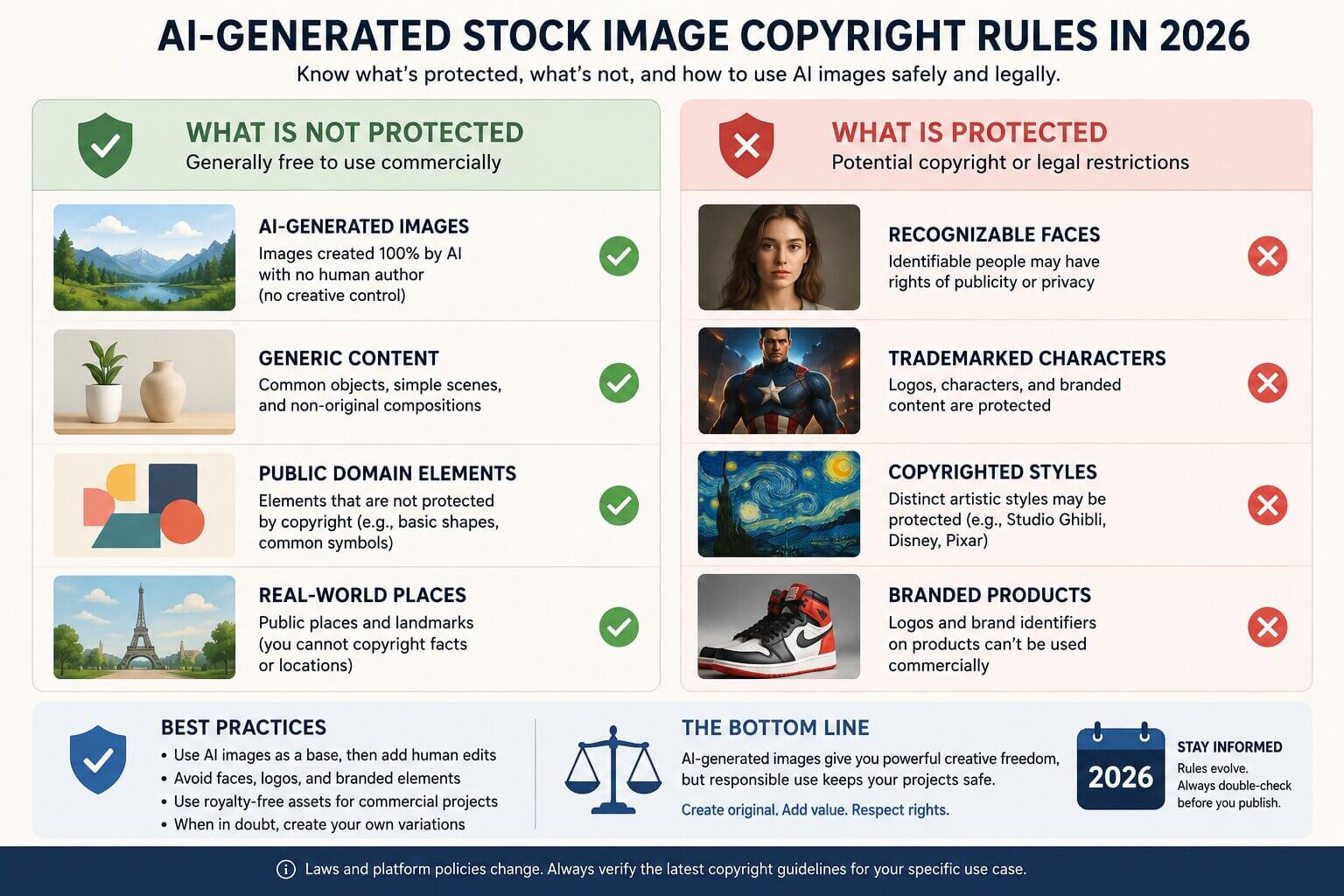
What this means practically: if you generate an image with a prompt and sell it with no further human creative input, you likely hold no copyright over that image. Anyone could legally reproduce it. That does not mean you cannot sell it — it means you cannot legally prevent others from using it either.
AI-Assisted Works Can Qualify for Copyright
AI-assisted works with substantial human creative input can qualify for copyright. Prompts, curation, and post-processing work contribute to ownership claims. The more human creative work you add — selecting the best outputs from many generations, editing in Photoshop, compositing elements, adjusting lighting and color — the stronger your legal claim to the final image.
Platform-Specific Rules Matter As Much As Copyright Law
- Disclose that the image is AI-generated during upload
- Do not generate images depicting real, identifiable people without consent
- Do not generate images that include trademarked logos, characters, or branded elements
- Do not generate images that closely imitate specific artists' styles
- Images containing text must have the text be accurate and legible
AI Images That Actually Sell: Best Niches for 2026
Not all image categories have equal demand. Research what buyers actually need before generating a single image.
Business and Professional Settings
This is the largest and most consistently purchased category in stock photography. Businesses, marketers, website designers, and presentation creators need images of professionals constantly. The demand for diversity and inclusion in stock imagery has grown substantially, and AI can produce this variety at scale. Keep professional settings clean, and add copy space wherever possible.
Seasonal and Holiday Content
Stock photo demand peaks significantly in December. Seasonal imagery has predictable and recurring demand. Building batches of seasonal content in advance of each season and uploading them 4 to 6 weeks early gives your images time to be indexed and discovered by buyers searching for that content.
How to Write Prompts That Produce Commercial-Quality Images
Most AI-generated images that fail platform review or fail to sell have the same root cause: the prompt was written for visual interest, not for commercial usability. Commercial stock image buyers want clear subjects, clean backgrounds, appropriate lighting, and compositional flexibility.
The Commercial Prompt Framework
A useful formula: [Subject] + [Lighting] + [Background] + [Composition detail] + [Style]
Business Image
Confident businesswoman in her 30s at a modern office desk, natural window lighting from the left, clean white background with soft bokeh, subject positioned to the right with copy space on the left, commercial photography style, photorealistic
Technology Concept
Abstract representation of artificial intelligence neural network, glowing blue nodes connected by fine lines on a dark background, wide horizontal composition, copy space on the right third, 4K commercial illustration style
Healthcare Image
Friendly female doctor consulting with a patient in a bright modern clinic, soft diffused lighting, teal and white color palette, shallow depth of field, professional commercial photography
Prompt Elements That Improve Commercial Quality
- "Natural lighting," "studio lighting," or specific directional light descriptions produce more consistent, professional-looking results
- Adding "copy space on the left" or "negative space in the upper third" makes images significantly more usable for designers
- "Clean white background," "simple gradient background," or "soft bokeh" keeps focus on the subject
- "Commercial photography style," "photorealistic," or "editorial photography" calibrates output toward stock-appropriate aesthetics
Best AI Tools for Stock Image Creation
Midjourney
Top PickProduces some of the most visually sophisticated AI images available. Strong artistic quality and cinematic lighting. Requires a paid subscription.
Leonardo AI
Free TierStrong control over image style and character consistency. Fine-Tuned Models allow training on a specific visual style. Strong free tier for getting started.
Flux Pro / Flux Ultra
Best RealismProduces highly photorealistic outputs with excellent prompt adherence. Particularly strong for commercial photography styles — business and healthcare niches.
Ideogram
Handles text within images better than most other tools — useful for creating templates or designs where text is part of the composition.
Adobe Firefly
Licensing ClarityTrained on licensed content, giving a cleaner commercial licensing position. Deeply integrated with Adobe Creative Cloud for post-processing in Photoshop.
Using ComfyUI to Build a Scalable Image Production System
ComfyUI is a free, node-based interface for running AI image generation models locally on your own computer. If you have a reasonably capable GPU (8GB VRAM or more), you can run powerful open-source image generation models like Flux, SDXL, or their fine-tuned variants locally — generating unlimited images at no per-image cost.
What Makes ComfyUI Useful for Stock Image Production
- Batch generation: automatically generate multiple variations of a prompt in one run
- Workflow repeatability: save a complete workflow — model, prompt structure, image settings, upscaling — and reproduce it exactly
- Model flexibility: access and run open-source models including specialized fine-tunes for specific visual styles
- No per-image cost: after the initial hardware investment, generation is free — which changes the economics of high-volume production
Best Platforms to Sell AI-Generated Images
Platform policies on AI-generated content vary significantly, and some have changed recently. Always verify the current policy directly on each platform before uploading.
Adobe Stock
20–33% royaltyRemains one of the highest-paying platforms for AI-generated images in 2026. AI content is fully accepted as long as it is labeled as AI-generated during upload. Large buyer base and high-quality commercial traffic.
Wirestock
Distribution serviceSubmits your images to multiple stock platforms simultaneously — including Adobe Stock, Shutterstock, Alamy, and Depositphotos. Takes a 15% commission but handles keyword optimization and platform management.
Freepik Contributor
Subscription modelAccepts AI-generated content and actively embraces it. Operates on a subscription model for buyers, which means consistent download volume rather than individual sale spikes.
Creative Fabrica
Per-downloadHas grown rapidly as a destination for digital designers and crafters. Accepts AI-generated graphics, patterns, clip art, and fonts.
Etsy
Set your own priceWorks well for AI-generated digital downloads — printable art, digital wallpapers, and design assets. Mandates clear labeling of AI-generated products.
Shutterstock
Stricter reviewHas a more cautious approach to AI-generated content. Check their current contributor guidelines before submitting — policies have evolved and may continue to change.
A Beginner Workflow: From Idea to Upload
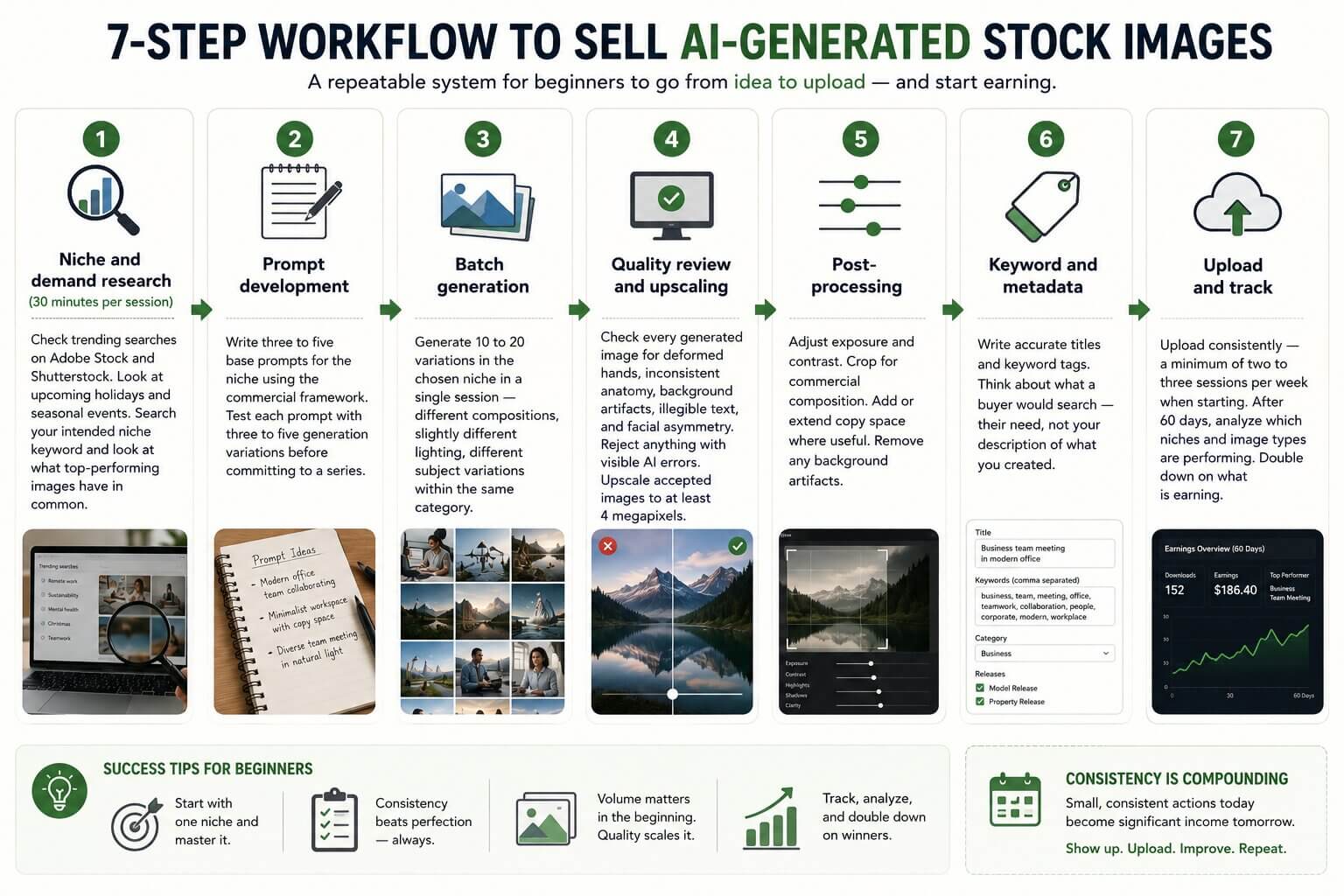
Niche and demand research (30 minutes per session)
Check trending searches on Adobe Stock and Shutterstock. Look at upcoming holidays and seasonal events. Search your intended niche keyword and look at what top-performing images have in common.
Prompt development
Write three to five base prompts for the niche using the commercial framework. Test each prompt with three to five generation variations before committing to a series.
Batch generation
Generate 10 to 20 variations in the chosen niche in a single session — different compositions, slightly different lighting, different subject variations within the same category.
Quality review and upscaling
Check every generated image for deformed hands, inconsistent anatomy, background artifacts, illegible text, and facial asymmetry. Reject anything with visible AI errors. Upscale accepted images to at least 4 megapixels.
Post-processing
Adjust exposure and contrast. Crop for commercial composition. Add or extend copy space where useful. Remove any background artifacts.
Keyword and metadata
Write accurate titles and keyword tags. Think about what a buyer would search — their need, not your description of what you created.
Upload and track
Upload consistently — a minimum of two to three sessions per week when starting. After 60 days, analyze which niches and image types are performing. Double down on what is earning.
Realistic Income Expectations
| Portfolio Size | Monthly Income | What It Takes |
|---|---|---|
| Under 50 images | $0 to $20 | Learning stage — not enough volume for consistent downloads |
| 50 to 200 images | $20 to $150 | Early income, highly variable by niche quality |
| 200 to 500 images | $100 to $500 | Consistent income begins with good niche targeting |
| 500+ images | $300 to $1,500+ | Compounding — older images continue earning |
Ranges vary by niche quality, platform mix, and keyword accuracy
These ranges vary significantly based on niche choice, image quality, keyword accuracy, and which platforms you are on. A well-targeted 200-image portfolio in a high-demand niche can outperform a poorly targeted 500-image portfolio. Most beginners see very little income in the first 60 to 90 days — income typically begins accelerating after the 3 to 4 month mark as the portfolio reaches critical mass.
Common Mistakes That Waste Months
Uploading randomly without niche research
Generating images of whatever looks interesting and uploading them across random categories produces a portfolio that never gains traction in any specific search. Buyers search by topic — your portfolio needs to be present in the searches they actually make.
Ignoring technical quality standards
Platforms are rejecting more AI-generated images than ever because of obvious AI artifacts. Images with warped hands, incorrect text, facial asymmetry, or background inconsistencies are rejected during review. Quality control before upload is not optional.
Treating it like passive income from day one
Stock image income becomes semi-passive after you have built a substantial, well-performing portfolio. During the building phase, it is active work — research, generation, editing, keywording, and uploading require consistent time each week.
Poor keyword strategy
An excellent image that is poorly keyworded will receive no downloads because buyers cannot find it. Think about what the buyer is searching for — their need and their search query — not what you would call the image from your perspective.
Skipping post-processing
Raw AI output often needs composition adjustments, color grading, and copy space additions to be maximally useful to commercial buyers. This step also adds the human creative input that strengthens your legal position.
Spreading across too many platforms at once
Start with one or two platforms and learn what performs well there before expanding. Managing uploads, metadata, and performance tracking across many platforms simultaneously is inefficient at the beginning.
Frequently Asked Questions
Join the discussion
Sign in to leave a comment or reply
No comments yet
Be the first to share your thoughts!