

ACE-Step 1.5: Free AI Music Generation in ComfyUI
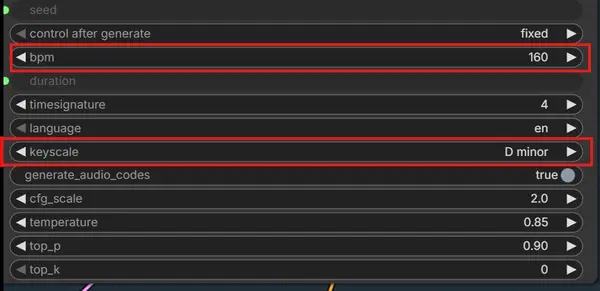
Looking for a free way to generate music like Suno AI? ACE-Step 1.5 is an open-source model you can run entirely on your own computer through ComfyUI. It supports many music styles, allows you to control lyrics, BPM, key scale, and song length, and works well on regular gaming PCs.
What Is ACE-Step 1.5?
ACE-Step 1.5 is an open-source AI music generation model. It lets you create full songs in different genres, control musical style through captions and lyrics, edit parts of existing songs, and even convert vocals into background music. It supports over 50 languages for lyrics and runs locally without any cloud dependency.
Completely Free
Open-source with no usage limits or subscription fees.
Multiple Genres
Pop, Rock, Hip-Hop, EDM, Jazz, Country, Metal, and more.
50+ Languages
Write lyrics in English, Spanish, Japanese, and many others.
Runs Locally
No internet required after setup. Runs on your own GPU.
Music Genres Supported — Listen & Download Workflows
Listen to sample tracks generated with ACE-Step 1.5 in ComfyUI. Each genre has a dedicated workflow you can download and use immediately. The caption and lyrics used for each track are included inside the workflow JSON file.
How to Use ACE-Step 1.5 with ComfyUI
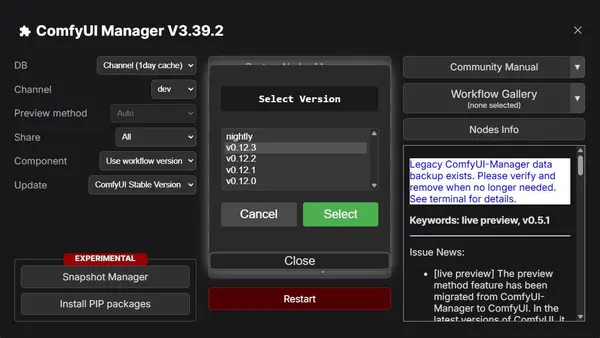
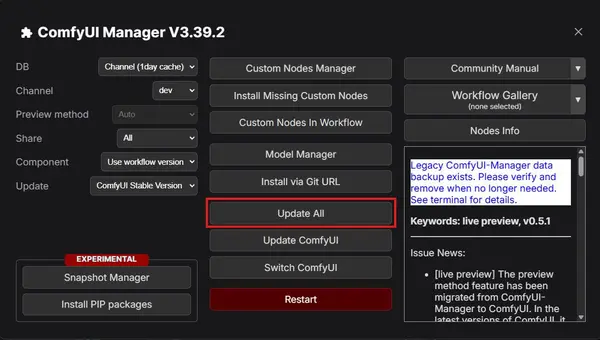
Step 1 — Update ComfyUI
Before loading the ACE-Step workflow, make sure your ComfyUI is fully up to date.
Step 2 — Fix Common Issues After Update
No Module Named 'comfyui_aimdo' Error
If you see this error after updating ComfyUI, you need to install the missing package manually:
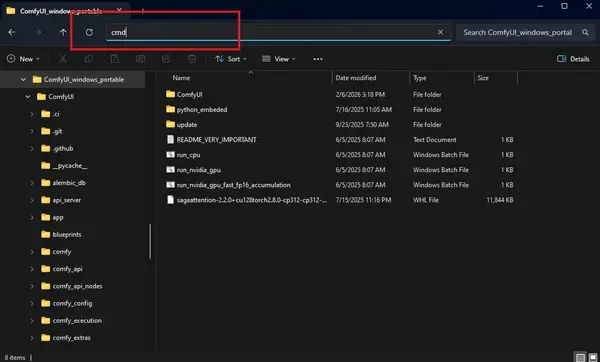
No Module named 'comfyui_aimdo'- Open your comfyui_windows_portable folder (where ComfyUI and python_embeded are located).
- Click in the folder address bar, type cmd, and press Enter to open a terminal in that folder.
- Run the command below:
.\python_embeded\python.exe -m pip install comfy-aimdo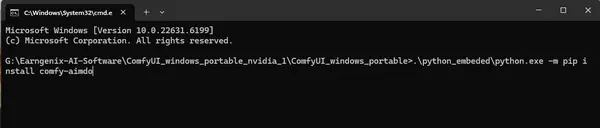
Check the Run Command (Windows)
If ACE-Step 1.5 generation is extremely slow or stuck, check your run_nvidia_gpu.bat file. Right-click it and choose Edit.
Make sure it contains exactly this command — do NOT include --lowvram:
.\python_embeded\python.exe -s ComfyUI\main.py --windows-standalone-build--lowvram flag makes ACE-Step 1.5 music generation extremely slow — sometimes taking hours instead of minutes. Remove it if it is present.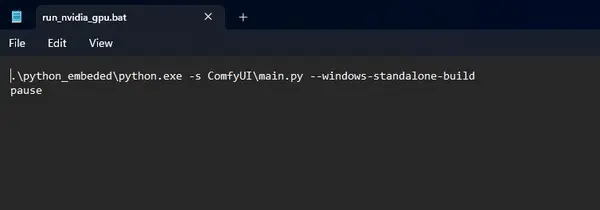
Step 3 — Download the ACE-Step 1.5 Workflow
Download the main ACE-Step 1.5 ComfyUI workflow below. Drag and drop the JSON file into ComfyUI to load it.
Download ACE-Step 1.5 ComfyUI WorkflowModel Files You Need
Download all four model files from Hugging Face and place them in the correct ComfyUI subfolders:
Diffusion Model
Text Encoders
VAE
Where to Put the Model Files
Place each file in the correct ComfyUI subfolder as shown below:
ComfyUI/
└── models/
    ├── diffusion_models/
    │   └── acestep_v1.5_turbo.safetensors
    ├── text_encoders/
    │   ├── qwen_0.6b_ace15.safetensors
    │   └── qwen_1.7b_ace15.safetensors
    └── vae/
└── ace_1.5_vae.safetensorsGenerating Your First Song
Once your workflow and models are ready, follow these steps to generate your first AI song:
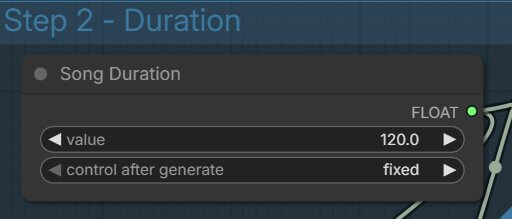
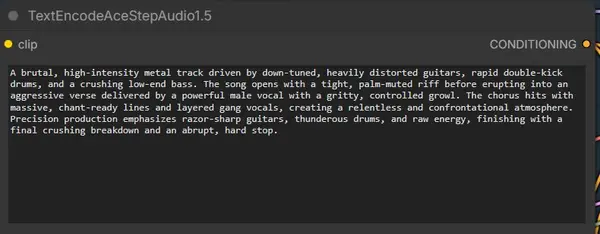
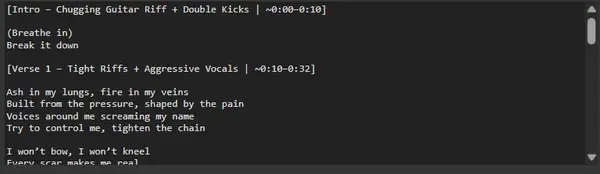
Tips and Troubleshooting
Do not use --lowvram in your run_nvidia_gpu.bat file.
Fix: The --lowvram flag makes music generation extremely slow with ACE-Step 1.5 — sometimes taking hours per song. Remove it from your .bat file and use the standard launch command.
Make sure all model files are in the correct subfolders.
Fix: If models are in the wrong folder, generation will fail or produce silence. Double-check the folder structure shown above: diffusion_models, text_encoders, and vae.
Getting errors after a ComfyUI update?
Fix: Open the Manager and click Install Missing Custom Nodes, then Update All. Make sure the comfy-aimdo package is installed using the pip command shown in this guide.
Output audio is silent or very short.
Fix: Check that the song length is set correctly (in seconds, not milliseconds). Also verify all three model types are loaded — diffusion, text encoders, and VAE are all required.
Frequently Asked Questions
Join the discussion
Sign in to leave a comment or reply
No comments yet
Be the first to share your thoughts!