
Quick Answer
ComfyUI, Automatic1111, Forge, Fooocus, InvokeAI, and StableSwarmUI are all free, open-source, and unlimited — no subscription, no image cap, no cloud filter watching what you type. If this is your first local AI tool, Forge or Fooocus will get you generating images the fastest. ComfyUI is the one to move to once you want full control over every part of the process.
Free local AI image tools like ComfyUI, Forge, and Fooocus let you create AI images on your own computer, using your own graphics card (GPU), instead of paying a monthly fee to a company like Midjourney. Once one of these tools is installed, you can generate as many images as you want, with no internet connection needed and no bill at the end of the month.
This guide covers all six of the most popular free tools, explains exactly what each one is good at, and tells you honestly where one of them has fallen behind in 2026 — so you can pick the right one on your first try, instead of installing all six one by one to figure it out yourself.
What Is a Local AI Image Editor, and Why Use One Instead of Midjourney or DALL·E?
A local AI image editor is a program you install directly on your own computer. It uses an AI model — a large file trained to turn text into images — that runs using your graphics card instead of a company's server somewhere on the internet. Once everything is installed and the model is downloaded, you don't need the internet at all to keep generating images.
This is different from a cloud tool like Midjourney or DALL·E in three ways that actually matter day to day.
Full privacy
Your prompts and images never leave your own computer. Nothing is uploaded, logged, or used to train someone else's model.
No subscription cost
Every tool in this guide is free to download and free to use, for as long as you want. The only real cost is the GPU you may already own.
Complete control
You choose exactly which AI model to run and adjust every setting — there's no company checking what you type.
Are These 6 Tools Really Free and Unlimited?
Yes, genuinely. Every single tool in this guide is open-source software, which means the code is public, free to download, and free to use — there's a $0 price tag and no subscription tier hidden behind it.
| Tool | License | Cost | Subscription? |
|---|---|---|---|
| Automatic1111 | Open-source (AGPL-3.0) | $0 | No |
| Forge | Open-source (AGPL-3.0) | $0 | No |
| ComfyUI | Open-source (GPL-3.0) | $0 | No |
| Fooocus | Open-source (GPL-3.0) | $0 | No |
| InvokeAI | Open-source (Apache-2.0) | $0 | No |
| StableSwarmUI | Open-source (MIT) | $0 | No |
Here's why there's no usage cap. When you use Midjourney or a similar cloud tool, your prompt is sent to that company's computer, they generate the image using their own hardware, and they charge you for that computer time. With a local tool, the image is generated entirely on your own GPU, so there's no company computer involved and nothing for anyone to charge you for.
That said, "unlimited" doesn't mean instant. Every image still has to be calculated by your graphics card, and how fast that happens depends on your GPU's VRAM (short for "video memory" — the dedicated memory built into your graphics card that holds the AI model while it's generating an image). More VRAM means faster generation and the ability to run bigger, more complex models; less VRAM still works, it just takes longer.
One more honest note: local generation isn't completely free in the strictest sense — you'll use a bit more electricity while your GPU is working. For a typical home setup, this cost is small enough that it's rarely worth worrying about, but it's worth knowing it exists.
Quick Comparison — Which of the 6 Should You Actually Install?
If you only have thirty seconds, this table is the fastest way to find your starting point.
| Tool | Best For | Difficulty | VRAM Min. | License |
|---|---|---|---|---|
| Fooocus | Zero-configuration first image | Beginner | 4 GB | GPL-3.0 |
| Forge | Fastest all-around free option | Beginner | 6 GB (8 GB comfortable) | AGPL-3.0 |
| Automatic1111 | Most tutorials and extensions | Beginner | 8 GB+ | AGPL-3.0 |
| InvokeAI | Artists, canvas-based editing | Beginner–Int. | 8 GB | Apache-2.0 |
| ComfyUI | Full workflow control | Intermediate | 6 GB | GPL-3.0 |
| StableSwarmUI | Batch generation at scale | Advanced | 6 GB+ (runs on ComfyUI) | MIT |
If you genuinely don't know where to start, pick Fooocus or Forge. Both are built so a complete beginner can go from "nothing installed" to "first image on screen" in under ten minutes, with almost nothing to configure.
Where Do Checkpoints and LoRAs Come From? (Open-Source AI Models, Explained)
Every tool covered in this guide is just the interface — the program you actually click around in. The part that decides what your images look like is a separate file called a checkpoint (this is the main AI model file — it controls the art style, quality, and general "look" of everything you generate). Checkpoints are open-source, meaning anyone can download them for free, and once you download one, you can use it as many times as you like.
There are two main places almost everyone downloads checkpoints from:
CivitAI ↗
The largest community hub for checkpoints, LoRAs (small add-on files that apply a specific style or subject on top of a checkpoint), and fine-tunes. Best for creative and unusual styles.
Hugging Face ↗
The leading platform for official model releases straight from the companies and research teams that built them. Best for the newest and most reliable model versions.
Checkpoint files are usually saved with a .safetensors file extension. Once downloaded, you move the file into a specific folder inside whichever tool you're using, and it becomes available to select from a dropdown menu the next time you open the program.
What Open-Source Models Can You Run With Them?
The interface (ComfyUI, Forge, and so on) decides how easy the tool is to use. The checkpoint decides how good — and how fast — the actual images look. Here are the most popular free options in 2026:
FLUX
Currently the leading open-source model for overall image quality, known for sharp detail and accurate prompt-following.
Stable Diffusion XL (SDXL)
The most widely supported model of all — great for detailed, high-resolution images, and usable on every one of the six tools here.
Use SDXL in ComfyUI →Qwen Image
Specializes in realistic, photography-style images with strong, natural-looking detail.
See Qwen Image Guide →DreamShaper
A popular community checkpoint with a flexible art style, good for both portraits and fantasy scenes.
Realistic Vision
Built specifically for photorealistic results, especially strong for portraits and product photography.
Juggernaut XL
A high-quality SDXL-based checkpoint known for detailed, realistic output.
All six tools in this guide can run every model on this list — choosing a tool never limits which checkpoint you're allowed to use.
The 6 Best Free Local AI Image Tools, Compared
Automatic1111 (A1111)
The original — largest community, most tutorials
Automatic1111 (often shortened to "A1111") was the first local AI tool built for Stable Diffusion models, and it’s still the one with the biggest community, the most YouTube tutorials, and hundreds of add-ons called extensions. Its development has slowed down over the past year or so, which is the main reason it’s no longer the first choice for a brand-new setup — Forge, covered next, gives you the exact same interface with noticeably better speed.
That said, A1111 is still a completely valid choice if what you care about most is documentation and community support. If an unusual extension only ever got built for one tool, it’s almost always A1111, simply because it’s been around the longest.
VRAM
8 GB or more is recommended. A1111 will run on less, but generation will be noticeably slower than the same setup on Forge.
Best for
People who want the most tutorials and community help available, and don’t mind slightly older performance in exchange.
Forge (Stable Diffusion WebUI Forge)
The faster, actively-maintained successor to A1111
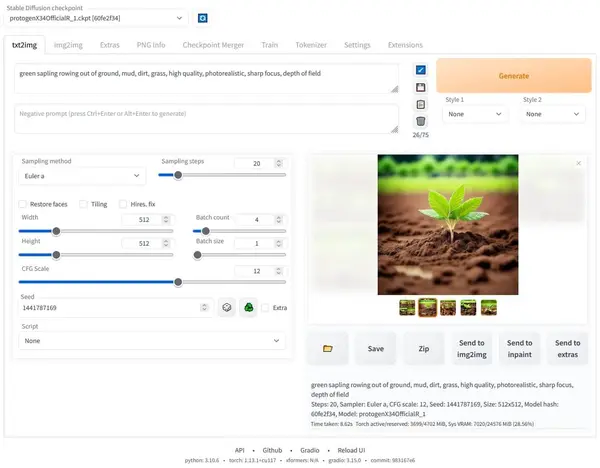
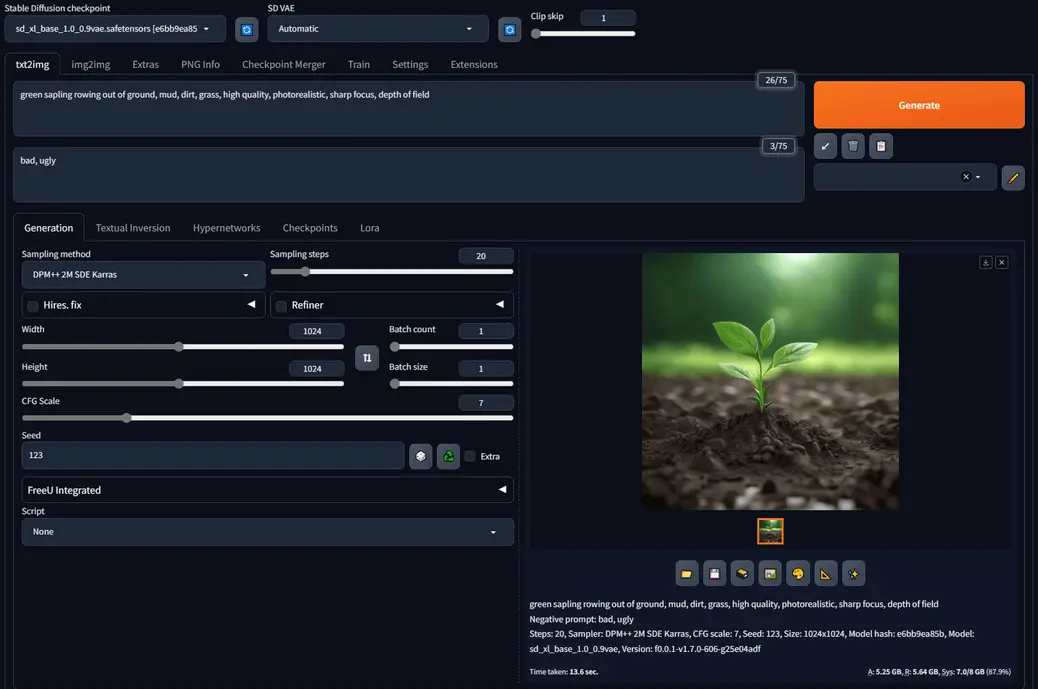
Forge is what’s called a "fork" of Automatic1111 — a separate developer took A1111’s original code and built their own improved version on top of it. Forge looks and works almost identically to A1111, and it supports most of the same extensions, so anything you already know from A1111 carries straight over with no relearning needed.
The real difference is speed and memory. Forge generates images noticeably faster, and it runs comfortably on graphics cards with less VRAM — the exact kind of GPU that would struggle on A1111. It’s also updated far more actively right now, so newer models like FLUX get supported sooner than on A1111.
VRAM
6 GB is the minimum, 8 GB is the comfortable zone for SDXL, and 4 GB is enough only for older SD 1.5 models.
Best for
Anyone starting completely fresh who wants A1111’s familiar layout, but faster and easier on a smaller GPU.
ComfyUI
Node-based power — the most flexible local AI tool
ComfyUI works completely differently from the first two tools. Instead of a single page of settings, it uses a drag-and-drop system made of "nodes" — small rectangular blocks that each do exactly one job. For example, the Load Checkpoint node loads your AI model, and the KSampler node is what actually generates the image. You connect these nodes together with lines to build a complete workflow, which is just the full sequence of steps your image goes through from prompt to finished result.
This sounds more complicated than it is at first, and it does take longer to learn than the other tools here. In exchange, ComfyUI gives you more precise control over every step than any other tool on this list, and it’s usually the first to support brand-new AI models the day they release.
VRAM
6 GB minimum. ComfyUI is generally the most memory-efficient of all six tools once you’re running longer, more complex generations.
Best for
People who want maximum control over their generation process, or who want to build a repeatable pipeline they can reuse.
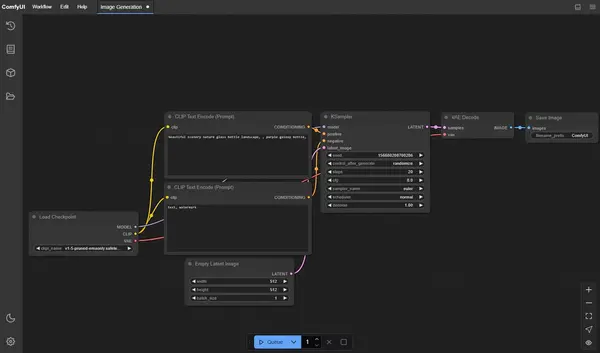
If ComfyUI sounds like the right fit, the node-based interface is easier to follow with steps in front of you — see our full ComfyUI install guide.
Fooocus
Simplest setup — now in maintenance mode
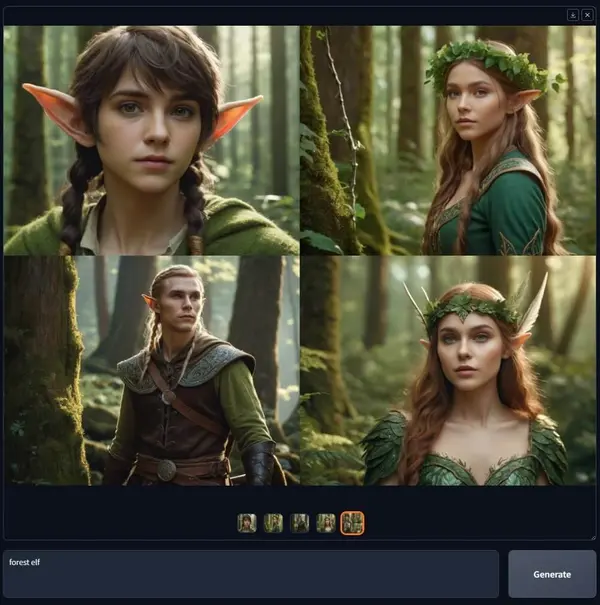
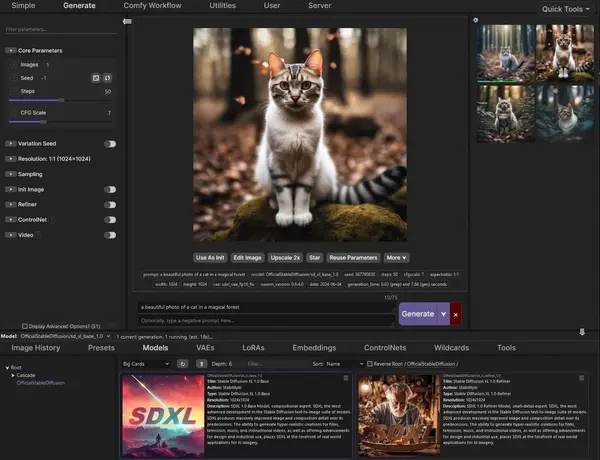
Fooocus is built around one idea: type a prompt, click generate, get an image. There’s no settings page to learn and no nodes to connect — the whole interface is a text box and a button, with the technical decisions handled automatically in the background. It’s based on the SDXL model and optimized to run on very little VRAM, which makes it the easiest of all six tools to get a first image out of.
Before you commit to it long-term, there’s something worth knowing. As of 2026, Fooocus is in limited long-term support — the developer only fixes bugs now, hasn’t added a genuinely new feature since 2024, and it doesn’t support newer models like FLUX. If you want a tool that keeps growing alongside new models, Forge or ComfyUI are the safer long-term picks. Fooocus is still a genuinely good first tool to learn on, and there’s a full step-by-step install guide for it on this site.
VRAM
4 GB minimum — the lowest requirement of any tool on this list.
Best for
Complete beginners who want to generate images with zero setup complexity.
InvokeAI
Clean modern UI — built for artists and creators
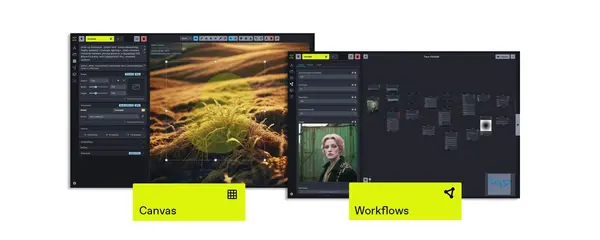
InvokeAI has a clean, modern interface built around a canvas — a workspace where you can paint, extend, and edit images directly, closer to how Photoshop works than a typical prompt box. Its community is smaller than A1111’s, Forge’s, or ComfyUI’s, but the polish of the interface and the quality of its editing tools make it a natural fit for people who think of themselves as artists first.
InvokeAI is particularly strong at inpainting (regenerating just one part of an existing image, useful for fixing a mistake without redoing the whole picture) and outpainting (extending an image beyond its original edges). Both are built in and easy to use, with no extra extensions needed.
VRAM
8 GB minimum.
Best for
Artists and designers who care as much about editing an image as generating it in the first place.
StableSwarmUI (SwarmUI)
Batch generation, and a real #2 alternative to Forge
SwarmUI is built for generating and organizing large batches of images at once, and it has a simpler settings panel than ComfyUI — even though, underneath, it actually runs the ComfyUI engine to do the generation itself. That’s an important detail: because it’s built on top of ComfyUI, SwarmUI gets support for brand-new AI models on the same day ComfyUI does, without ever forcing you to build a node graph by hand.
This has made SwarmUI one of the strongest real alternatives to Forge for people who’ve outgrown a simple prompt box but don’t want to learn ComfyUI’s node system directly.
VRAM
No separate official minimum is published. Since it runs on the ComfyUI engine underneath, plan around the same 6 GB+ baseline as ComfyUI itself.
Best for
People who need to generate and organize hundreds of images at once, or who want ComfyUI’s model support without building node graphs themselves.
How Do I Choose Between These 6 Tools?
If you already know exactly what you need, match it to a tool using the list below. If you're still not sure, start with Fooocus or Forge — both will get you a working first image within minutes, and switching to a different tool later is always an option, since none of these lock you in.
I want zero configuration and the fastest possible first image — use Fooocus
I want the most tutorials and community help available — use Automatic1111
I want the A1111 experience, but faster and lighter on VRAM — use Forge
I want full node-level control and the newest models first — use ComfyUI
I want a polished, artist-focused canvas interface — use InvokeAI
I need to batch-generate hundreds of images or automate a pipeline — use StableSwarmUI
Not sure which of the six actually fits your workflow yet? Our deeper ComfyUI vs Fooocus comparison walks through both extremes of the difficulty spectrum in more depth than a six-tool overview can.
Common Problems When You First Install a Local AI Tool
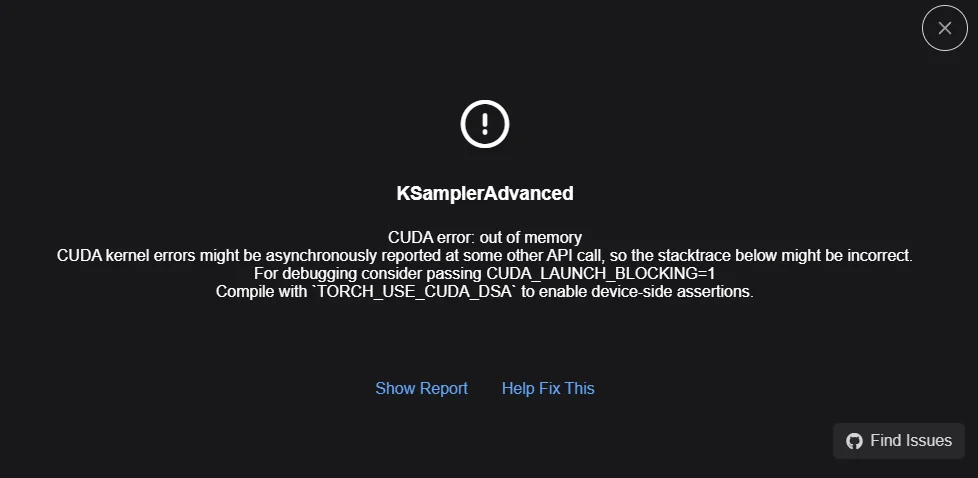
"CUDA out of memory" or a black/empty image
What causes it: Your GPU ran out of VRAM partway through generating an image — it simply didn't have enough dedicated memory to finish the job. It happens most often on Fooocus or Forge when you try a resolution, batch size, or model that's too demanding for your specific graphics card.
How to fix it: Lower the image resolution first, then try reducing the batch size (the number of images generated at once) down to 1. If it still happens, try switching to a smaller model — an SD 1.5 model uses far less VRAM than an SDXL or FLUX model.
Model won't show up in the dropdown
What causes it: Every tool expects checkpoint files to sit inside one specific folder — usually named something like models/Stable-diffusion — before it will list them as an option. A model that isn't showing up is either in the wrong folder, or the download didn't fully finish.
How to fix it: Confirm the file size matches what the download page said it should be, move the file into the correct model folder if it isn't there already, then fully close and reopen the tool so it re-scans the folder.
Nothing happens when you click Generate / the app won't start
What causes it: This is almost always a missing piece of software the tool needs — most commonly Python (a programming language many of these tools are built on) or a specific CUDA version (NVIDIA's software that lets programs use the GPU) that wasn't installed correctly during setup.
How to fix it: Look at the terminal or command-line window that opened behind the app when you launched it — most tools open one automatically, and it usually prints the exact name of whatever's missing. Searching that exact error message is often the fastest way to a fix.
Frequently Asked Questions
What to Do Next
Not sure which of the six fits your workflow?
Read our deeper ComfyUI vs Fooocus comparison — it walks through both extremes of the difficulty spectrum in more depth than a six-tool overview can cover.
What to Read Next
If you're leaning toward ComfyUI specifically, it's worth reading why ComfyUI is worth the learning curve before you commit. If you want the theory behind all six of these tools, our Stable Diffusion guide covers how the underlying model actually works. And if you've picked Automatic1111 or Forge, our step-by-step install guide gets you running in one pass.
— Written as a personal recommendation from the Earngenix team.
Published: 2024-07-01 · Last updated: 2026-09-25
Join the discussion
Sign in to leave a comment or reply
No comments yet
Be the first to share your thoughts!